

You are living the “bootstrapper’s reality.” You have a list of leads, but zero time to call them and even less budget for enterprise stacks. Dropping $135/user/month on tools like Outreach or Salesloft isn’t an option when you’re watching every dollar of your burn rate.
Yet, manual dialing is a death sentence. You cannot scale by punching numbers into a keypad one at a time.
The good news? You don’t need a Fortune 500 budget to compete. We ranked the best cheap auto dialers that don’t sacrifice call quality, plus, we’ll show you a “Zero-Dial” hack that cuts costs even further while tripling your connection rates.
The “Time vs. Money” Dilemma: Why Startups Need Automation
For a founder or a small sales team, time is the most expensive asset. Manual dialing effectively sets that asset on fire. To understand why automation is non-negotiable, you have to look at the numbers.
The Math of Manual Dialing
A hardworking sales rep can make about 40 to 50 calls per day if they are dialing manually. This includes the time spent looking up numbers, dialing, and logging notes. In contrast, an autodialer removes the friction, allowing the same rep to make 150+ calls in the same timeframe. Essentially, you are tripling your productivity without hiring a single new employee.
Burn Rate vs. Growth
Startups are in a constant race against their burn rate. You need to close deals fast to survive, but hiring more sales reps is often too expensive for early-stage companies. Automation acts as the bridge. It allows a one-person team to produce the output of three people, extending your runway and boosting revenue.
The “Cheap” Trap
However, you must be careful. While you need affordable software, the absolute cheapest option isn’t always the best. If your calls drop every five seconds or the audio quality sounds robotic, you will burn through your leads without making a sale. Therefore, finding the balance between cost and reliability is critical. For more insights on how efficiency drives revenue, check out these Sales Productivity Statistics.
Power Dialer vs. Predictive Dialer: What Can You Actually Afford?
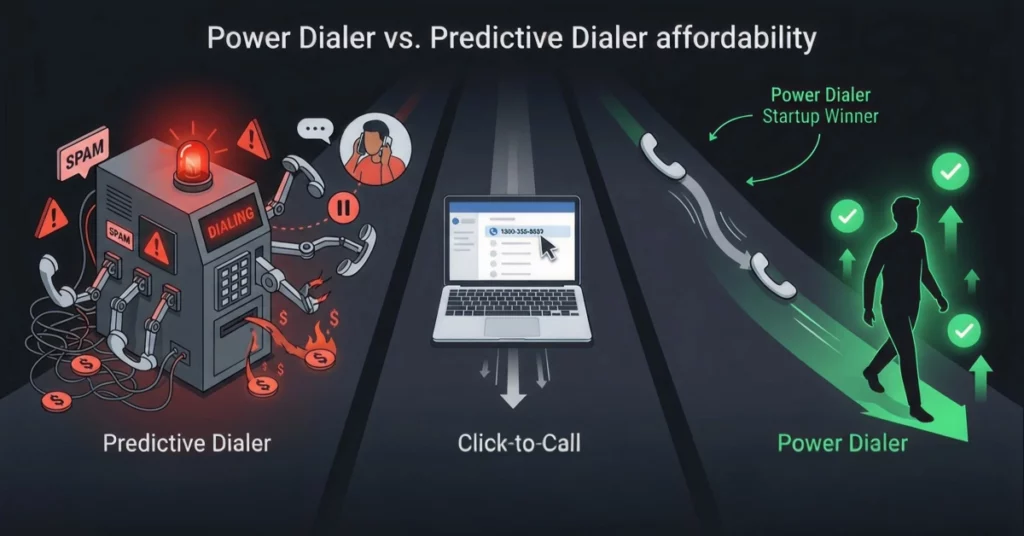
Most “cheap” dialers fall into two categories. Choosing the wrong one will ruin your brand reputation.
Predictive Dialers (The “Call Center” approach)
This tech dials 5 numbers at once and only connects you when a human answers.
- Pros: High volume.
- Cons: Expensive and causes “Telemarketer Delay” (that 3-second silence before you speak). It screams “Spam.”
Power Dialers (The Startup Choice)
This dials one number immediately after you finish the previous call.
- Pros: Instant connection (no awkward pause), cheaper per user, and a human call feel.
- The Verdict: For early-stage startups, stick to a Power Dialer.
Click-to-Call
This lets you click a number on your screen to dial, eliminating manual entry.
- Pros: Better than a physical phone.
- Cons: It is not true automation and lacks the speed of a power dialer.
Top 5 Cheapest Auto Dialers for Startups (Ranked)
We have analyzed the market to find tools that respect your budget. Here are the top 5 picks that offer the best value for money in 2026.
1. CallHippo (The Global Budget King)
- Starting Price: Approx. $16/user/month.
- Best For: International calling.
- Why it wins: If your leads are global, CallHippo offers the best rates for international numbers. It’s a no-frills power dialer that gets the job done.
2. Kixie (The Integration Specialist)
- Starting Price: Approx. $35/user/month (Quarterly).
- Best For: HubSpot/Zoho users.
- Why it wins: Kixie’s “PowerCall” extension lives inside your CRM. It’s slightly pricier but saves hours of data entry, effectively paying for itself.
3. PhoneBurner (No Delay Dialing)
- Starting Price: Approx. $127/user/month.
- Best For: perfect connection quality.
- Why it wins: It’s not the “cheapest” on paper, but it uses a unique cloud-based system that eliminates all audio delay. You pay more to ensure you never lose a lead to technical lag.
4. JustCall (Feature Rich)
- Starting Price: Approx. $29/user/month.
- Best For: SMS & Call bundles.
- Why it wins: Startups need to text and call. JustCall offers a unified inbox so you don’t have to toggle between apps.
5. Aircall (Best for Small Teams)
- Starting Price: Approx. $30/user/month (min 3 users).
- Best For: Rapid onboarding.
- Why it wins: The “Apple” of dialers. It’s incredibly easy to use. If you are hiring non-technical sales reps, this is your safest bet.
For a broader look at user reviews, visit this list of the best auto dialer software.
The “Hidden Costs” of Cheap VoIP Dialers
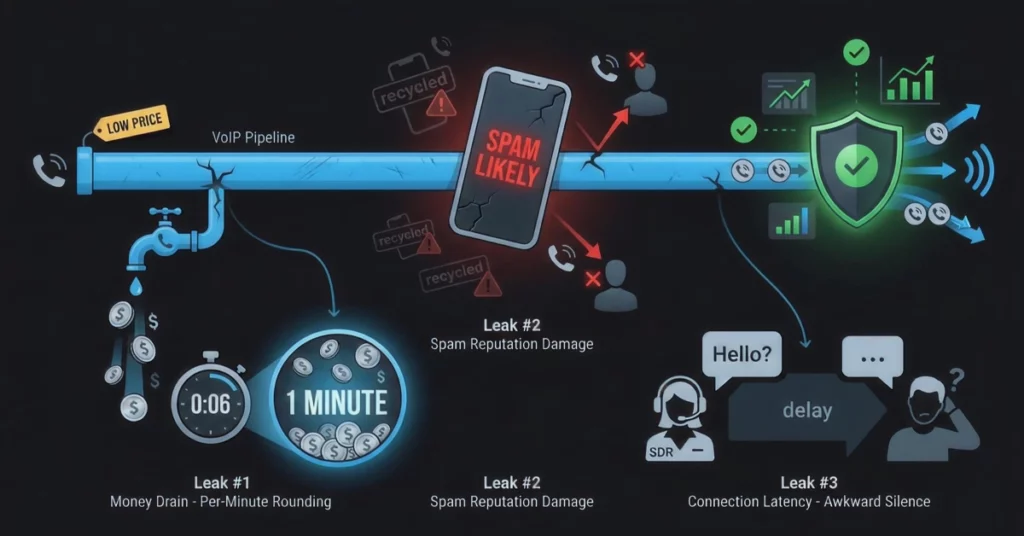
While the monthly subscription might look low, cheap dialers often come with hidden expenses that can hurt your bottom line. You need to be aware of these traps before signing up.
Per-Minute Rounding
Some budget dialers aggressively round up your call times. For example, a 6-second voicemail drop might be billed as a full 1-minute call. Over thousands of calls, this “rounding up” can significantly inflate your bill.
The “Spam Likely” Label
Cheap providers sometimes recycle “dirty” numbers that carriers have flagged. As a result, your calls might show up as “Spam Likely” on your prospect’s phone. If they don’t answer, the dialer’s cost is wasted.
Connection Latency
We mentioned this earlier, but it bears repeating: latency kills sales. Low-quality VoIP lines often exhibit delays. If you say “Hello” and the prospect doesn’t hear it for two seconds, the awkward pause immediately disrupts the natural flow of the conversation.
Pro Tip: Even the cheapest auto-dialer can get expensive if you are calling disconnected lines or bad data. Before you upload your CSV, you must ensure your numbers are active. Use 1Lookup to validate your list instantly. 1Lookup is built by the same team as VoiceDrop. It removes invalid numbers and identifies line types (mobile vs. landline), ensuring every cent of your budget goes towards a real conversation.
The “Zero-Dial” Strategy: Why Smart Startups Use RVM Instead
What if the cheapest way to dial was not to dial at all? Instead of spending hours listening to ringing tones, smart startups are switching to Ringless Voicemail (RVM).
Stop Paying for Ringtones
With a standard auto dialer, you are paying for the time your rep spends listening to rings and answering machines. With RVM, you bypass this entirely. You only pay for message delivery, ensuring 100% of your budget goes toward actual outreach.
10x Your Reach
A human using a power dialer can make about 100 calls a day. In comparison, VoiceDrop can send 10,000 messages in minutes. This allows you to cover your entire total addressable market in a single afternoon rather than months.
The “Inbound” Flip
The strategy here is simple: stop cold calling. Instead, use Ringless Voicemail Marketing to drop a friendly message. Then, wait for interested leads to call you back. You flip the dynamic from cold outbound to warm inbound.
How to Build a “Hybrid Stack” for Under $100/Month
You don’t have to choose between a dialer and RVM. Use this “Recipe for Success” to keep CAC (Customer Acquisition Cost) low:
- Enrich Your Data: You can’t text a landline. Use 1Lookup to “skip trace” your list and find the direct mobile numbers for your prospects.
- Filter with VoiceDrop: Blast a ringless voicemail to your new mobile list: “Hey, it’s [Name], I have a quick question about [Topic], give me a call back.”
- Automate SMS Follow-Up: Use Mass Text Messaging to nudge them immediately after the voicemail lands.
- Dial the Hand-Raisers: Now use your cheap auto-dialer (like CallHippo) to call only the people who replied. You just saved 90% of your manual labor.
Protecting Your Startup: Compliance & Spam Laws
When using budget tools, compliance often falls to you. Ignoring regulations like the TCPA can lead to massive fines that could bankrupt a startup.
Respecting the DNC (Do Not Call)
You must scrub your lists against the federal Do Not Call registry. Ensure your software provider allows you to automatically exclude these numbers so you don’t accidentally contact a litigator or a protected consumer.
Number Rotation
If you make hundreds of calls from a single number, carriers will block you. You need a tool that automatically rotates your Caller ID numbers. This practice keeps your reputation healthy and ensures your calls actually get through.
Opt-Out Management
Always provide a way for leads to say “Stop,” whether it is a keystroke during a call or a reply to a text. Managing these opt-outs is not just polite; it is the law. Review this TCPA Compliance Checklist to ensure your campaigns comply with the law.
Handling the Volume: When the “Cheap” Strategy Works Too Well
Once you implement the “Zero-Dial” strategy, you might face a new problem: too many callbacks.
Routing Calls to Mobiles
You cannot be tied to your desk 24/7. Ensure your dialer or RVM software forwards calls to your personal cell phone when you are out of the office. This guarantees you never miss a hot lead.
Using AI Agents
If the volume becomes unmanageable, you can use technology to clone yourself. AI Voicemail agents can answer inbound calls, qualify the lead, and even book appointments for you while you sleep.
Speed to Lead
The faster you respond, the more likely you are to close the deal. By automating the initial outreach, you free up your time to focus on that critical first 5 minutes after a lead responds.
Conclusion
You don’t need a massive budget to compete with the giants; you need a smarter stack. By combining a budget-friendly auto-dialer for warm leads with a high-volume VoiceDrop campaign for cold outreach, you can outperform competitors spending 10 times as much.
Stop paying to listen to dial tones.
Get a free demo of VoiceDrop today and start your “Zero-Dial” campaign.
FAQs
Is a power dialer legal for startups?
Yes, power dialers are completely legal as long as you comply with TCPA laws and do not call numbers on the DNC list without consent.
How much data does a VoIP dialer use?
VoIP typically uses about 0.5 MB to 1 MB of data per minute. Therefore, ensure your startup has a stable, high-speed internet connection to prevent dropped calls.
Can I integrate these dialers with Excel?
Yes, most cheap dialers allow you to upload a CSV file directly. This means you do not strictly need a CRM to get started; you can run your sales operations directly from a spreadsheet.
