

Stop the “Alt-Tab Nightmare.” For thousands of sales reps, the workday is a blur of toggling between browser tabs and phone apps, manually typing digits, and praying they didn’t make a typo. This repetitive friction breaks your focus and turns a high-value sales role into a low-value data entry job.
There is a faster way. A Click-to-Call Browser Extension transforms your entire web browser into a phone.
By scanning web pages such as LinkedIn profiles, Gmail threads, and company websites, the software automatically detects phone numbers and converts them into clickable links.
Therefore, you can turn your cursor into a dialing finger. If you can see the number, you can call it instantly without ever touching a keypad.
The Mechanics: How Chrome “Reads” a Phone Number
How Chrome “Reads” a Phone Number. You might wonder: How does the browser know the difference between a phone number and a zip code? The technology uses smart DOM Scanning.
- Pattern Recognition: The extension scans the page’s HTML for specific number patterns (like +1-555 or (555)).
- The “Tel” Protocol: Once identified, it overlays a hyperlink on the number. When clicked, it fires a command to your VoIP app (like VoiceDrop) to dial instantly.
The best part? It works as a visual overlay. It doesn’t change the website you are visiting; it simply enhances the data to make it actionable.
The Hidden Costs of Manual Dialing (Why You Need This)
While the convenience is obvious, the financial impact of manual dialing is often overlooked. If you are not using a click-to-dial tool, you are paying a “hidden tax” on every single interaction.
The “Fat Finger” Error Rate
Manually entering 10 digits results in misdials. Every wrong number dialed is time wasted on an awkward apology or a “number not found” recording. Click-to-call offers 100% transcription accuracy because it uses the exact data displayed on the screen.
Pro Tip: Accuracy only matters if the number is real. To avoid wasting clicks on disconnected lines, always verify your lead lists to ensure connectivity is valid before you start dialing. 1Lookup is built by the same team as VoiceDrop.
The Time Tax
Saving 15 seconds per call sounds small, but do the math:
- 15 seconds x 100 calls = 25 minutes lost daily.
- 25 minutes x 5 days = 2+ hours lost weekly.
According to sales productivity statistics, eliminating this administrative drag is the single fastest way to increase revenue.
Click-to-Call vs. Copy-Paste vs. Power Dialers
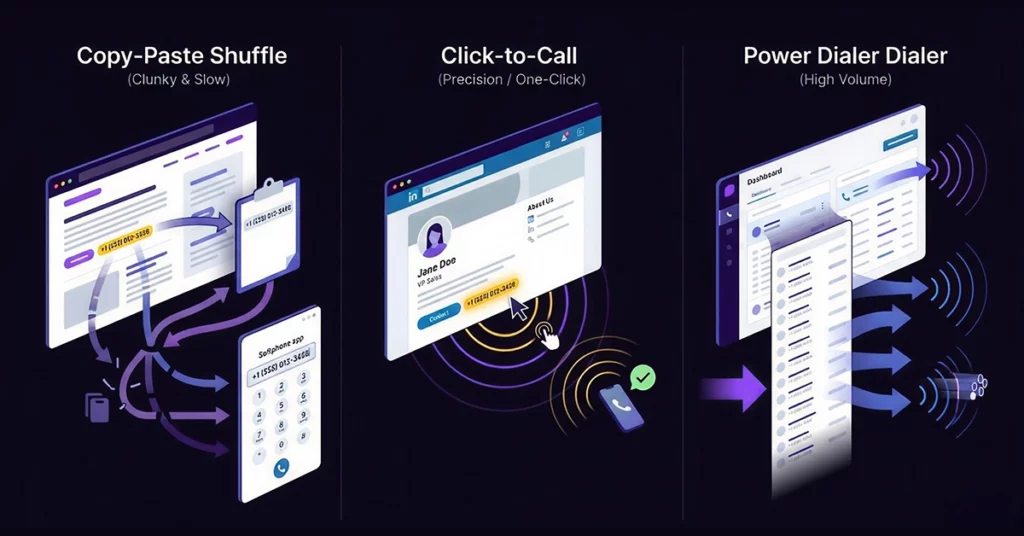
To understand where this tool fits in your tech stack, it is helpful to compare it against other common dialing methods.
The Copy-Paste Shuffle
The most common alternative to click-to-dial is the “Copy-Paste Shuffle.” This involves highlighting a number with your mouse, copying it, opening a softphone app, pasting it, and hitting send. While this is faster than manual typing, it is still slow and clunky, and it disrupts your workflow.
The One-Click Solution
In contrast, the click-to-call extension represents the “One-Click Solution.” This approach is the sweet spot for “Sniper” prospecting, where you research specific people and call them one by one from LinkedIn or company “About Us” pages.
When to Upgrade to a Multi-Line Dialer
However, we must be honest about the limitations of single-click dialing. If you have a list of 1,000 cold leads, clicking each one individually is simply too slow. In that specific scenario, you need a Power Dialer or a Multi-Line Dialer to handle the volume.
VoiceDrop offers solutions for both needs, ensuring you have the right tool whether you are sniping high-value targets or blasting through a cold list.
Must-Have Features in a Modern Sales Extension
Not all browser extensions are created equal. When selecting a tool for your team, base your decision on specific, high-value features.
Intelligent Number Parsing
First and foremost, the extension must be smart enough to recognize various number formats. Whether the number is formatted as “(555)”, “555-“, or “+1 555”, the tool should accurately identify it while ignoring non-phone numbers, such as zip codes or IP addresses.
Seamless CRM Synchronization
Don’t just install a dialer; install a workflow accelerator.
- Intelligent Number Parsing: The tool must be smart enough to ignore non-telephone numbers (e.g., IP addresses) and automatically recognize international formats (e.g., +44, +1).
- Seamless CRM Sync: This is non-negotiable. The click shouldn’t just dial; it must automatically log the call duration and recording in Salesforce or HubSpot. Check out VoiceDrop CRM integrations to see how we handle this admin work in the background.
Local Presence & Caller ID
Trust is essential for getting prospects to pick up the phone. Advanced extensions allow you to change your outgoing Caller ID to match the region you are calling.
For example, if you are calling a prospect in California, the system can display a California area code, significantly boosting your pickup rates.
Automating the Voicemail Process
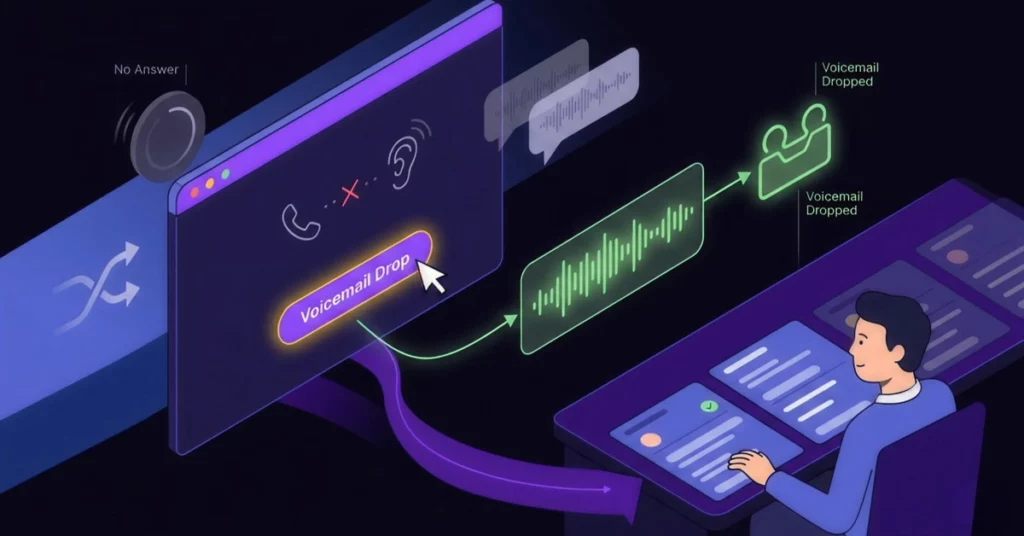
What happens when you click the number, but nobody picks up? A robust browser extension should have a workflow for this common scenario.
One-Click Voicemail Drop
You should not waste valuable energy repeating the same “Please call me back” message thirty times a day. Instead, top-tier extensions allow you to click a single button to leave a pre-recorded message and instantly move to the next prospect.
These Ringless Voicemail Drops ensure your message is delivered perfectly every time, without you having to stay on the line.
Security & Privacy: Is Your Data Safe?
A common objection among IT managers involves security. Users are often wary of installing extensions that “read data” on web pages.
Encryption and Permissions
It is important to note that reputable extensions use encrypted connections, typically via WebRTC, and do not store your browsing history. They simply “look” for regex patterns (number formats) and turn them into links, without considering the page’s context.
For peace of mind, always verify that the tool complies with Chrome Web Store security standards to ensure your corporate data remains protected.
Strategic Use Cases for High-Velocity Teams
This technology shines brightest when applied to specific sales workflows. Here is how top teams are using it.
LinkedIn & Social Selling
Social selling is all about speed and context. The ideal workflow involves finding a prospect on LinkedIn, identifying their contact info in their bio, and dialing immediately without ever leaving the browser tab.
Google Maps Prospecting
This tool is also powerful for local SEO or B2B sales, such as calling restaurants or medical clinics. You can pull up a list of businesses on Google Maps and click phone numbers directly from the listings, drastically speeding up local outreach.
If a business listing lacks a direct mobile number, you can use skip-tracing tools to obtain accurate contact information for the decision-maker before you initiate the call.
Working from Google Sheets
Many startups still use spreadsheets as a “poor man’s CRM.” A click-to-call extension transforms a static Google Sheet into a functional dialing list, turning every cell containing a number into an active button.
According to the latest state of sales report, efficiency tools like this are critical for staying competitive in a tight market.
Conclusion
In 2026, manual dialing isn’t just slow; it’s a liability. In a landscape where speed-to-lead defines success, relying on a physical keypad keeps you stagnant.
Stop typing. Start clicking. Double your outreach speed today.
Ready to transform your browser into a sales engine? Book a VoiceDrop demo and experience the difference.
FAQ’s
Does click-to-call work with Salesforce and HubSpot?
Yes, most professional extensions are designed to integrate natively with major CRMs. This ensures that every call made from the browser is automatically logged in the client’s record.
Do I need a specific VoIP phone system?
It depends on the extension. Some extensions are universal and act as link handlers, opening your default calling app, such as Zoom or RingCentral. However, others are proprietary to specific dialer platforms, such as VoiceDrop, for enhanced features.
Is the extension free to use?
Many extensions offer a “Freemium” model. While the basic “click” functionality may be free, advanced features such as Call Recording, Local Presence, and CRM Sync typically require a paid subscription.
