
Keep the schedule full with reminders and recalls that patients actually hear
Dental offices use VoiceDrop to send appointment reminders, six-month recalls and reactivation messages to their own patients, in the voice of the front desk they already know.
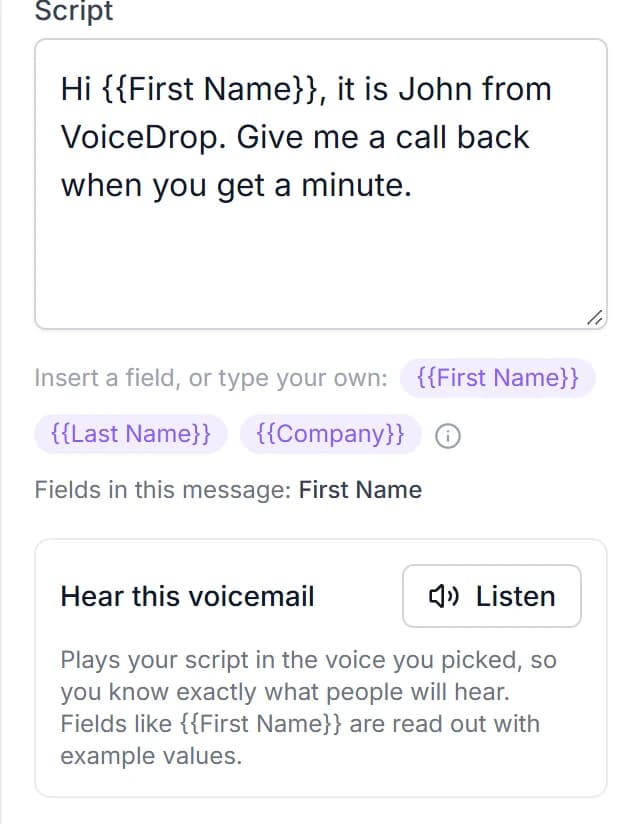
A sample appointment reminder, as the patient sees it.
Dental marketing works best when it starts with the patients already in your chart.
Every message goes to a patient who has been to your office and gave you their number, never to a cold list.
- Send dental appointment reminders in a voice patients know from the front desk
- Run your recall system so patients due for a six-month visit hear from you
- Reactivate patients who have not been in for 12 months or more
- Fill a last-minute opening by messaging your short-notice waitlist
- Follow up on treatment that was never scheduled, without naming it in the message
- Keep every message to the practice name, the patient's first name and the time
Here are six voicemails a dental office can send to its own patients.
Every name and practice here is invented. None names a procedure or a health detail: only the practice, the patient's first name and a time.
Remind patients about the appointment.
“Hi Maya, it's Jen at Brightside Dental. You're on our schedule Thursday at ten. Call us back if you need a different time.”
Invite patients back at six months.
“Hi Tom, it's Jen at Brightside Dental. It's about time for your next visit. Call us back and we'll find a time that works for you.”
Reach patients who have not been in for a year.
“Hi Rosa, it's Jen at Brightside Dental. It's been a while and we'd love to see you again. Call us back and we'll find you a time.”
Fill a last-minute opening from your waitlist.
“Hi Ben, it's Jen at Brightside Dental. A spot just opened up tomorrow morning. Call us back if you'd like it.”
Follow up when a visit was never scheduled.
“Hi Alicia, it's Jen at Brightside Dental. We'd like to find you a time for your next visit. Call us back whenever you have a minute.”
Remind patients before the year ends.
“Hi Carol, it's Jen at Brightside Dental. The year is almost over and we still have openings in December. Call us back and we'll book you in.”
VoiceDrop gives a dental office the tools a recall campaign needs.
AI Voice Cloning
Clone your voice from a 60-second sample and send warm, human-sounding voicemails at scale - never robotic text-to-speech.
Personalization at Scale
Merge first names, balances, addresses, rates, or any CSV/CRM field into every drop so each message feels one-to-one.
Smart Scheduling
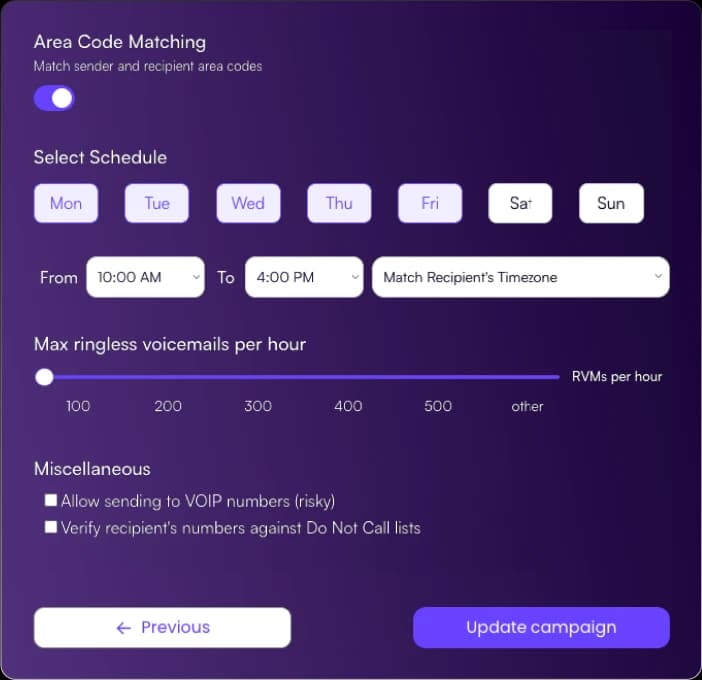
Schedule drops for the perfect local time window and let Multi-Attempt Delivery™ retry until messages land.
AI Inbound Agent
Answer callbacks 24/7, qualify interest, and save each caller's best time to talk - included, not an add-on.
Two-Way SMS
Pair voicemails with follow-up texts so prospects can reply, confirm, or book the moment they're ready.
SOC 2 Type II Security
One of the very few SOC 2 Type II certified RVM platforms - your lead and voice data stays encrypted end to end.
A dental office can go from recall list to scheduled voicemails in three steps.
No reminder-call afternoons at the front desk. Record once, upload your list and let callbacks book themselves.
- 1Step 1
Clone the voice patients hear at the front desk.
Record a 60-second sample from your office manager or patient coordinator. Every message sounds like a familiar call from your practice, never like robotic text-to-speech.
- 2Step 2
Export your list and add each first name.
Pull the recall, reminder or waitlist report from your practice management system as a CSV and merge each patient's first name and appointment time. DNC scrubbing runs before anything sends.
- 3Step 3
Schedule the drops and let the callbacks come in.
Time delivery for the hours your desk can answer. Patients who call back at lunch or after close reach the AI Inbound Agent, which saves the best time for your desk to call back.
A patient recall system finds everyone who is due and reaches them all.
Every practice has patients who are six, twelve or eighteen months from their last visit. Export that list once and send a warm voicemail from the front desk to all of them, instead of calling a few each afternoon.
- Upload the recall report from your practice management system as it is
- Send a six-month recall message and a separate 12-month reactivation message
- Multi-Attempt Delivery™ retries until the message lands
A same-day opening gets filled before the chair sits empty.
When a patient can't make it, the opening is gone by lunch unless someone calls the waitlist. One voicemail reaches the whole short-notice list at once, and the first patient to call back gets the spot.
- Keep a short-notice list in your CSV and send to it in minutes
- Two-way SMS lets a patient claim the spot with a reply
- The AI Inbound Agent answers callbacks while your desk is on another line
Every message says only the practice, the first name and the time.
Dental appointment reminders don't need to say what the visit is for. A script with the practice name, the patient's first name and the appointment time keeps health details out of the voicemail and still fills the chair.
- Merge the first name and appointment time from your CSV into each message
- Never name a procedure, a diagnosis or a balance in the recording
- Campaign analytics show deliveries and callbacks for each list
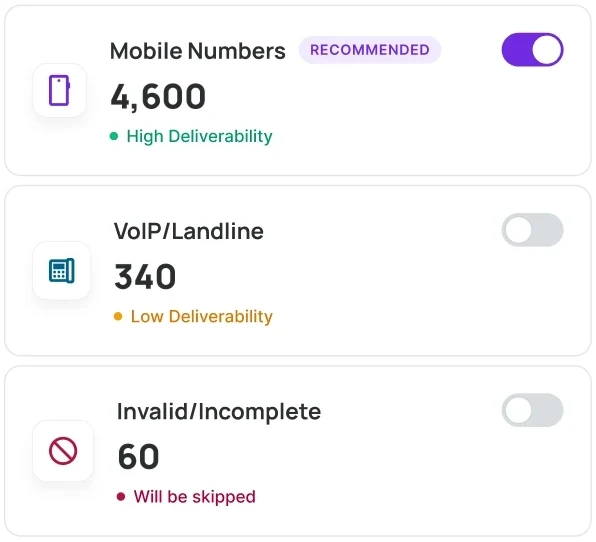
Here is what a patient reminder campaign looks like inside VoiceDrop.
Type II certified infrastructure
In free credits on every new account
Languages supported for voice cloning
A patient recall system works best when the message is short and the voice is familiar.
Postcards get tossed and unknown numbers go unanswered, but patients check voicemail. A ringless voicemail lands without ringing the phone, plays in the front desk's voice, and lets the patient call back when it suits them. The same list runs your dental recall system, your reactivation push and your waitlist. Medical offices have their own page: see ringless voicemail for healthcare.
Run each recall file through the phone number validator so credits go to working lines. DNC scrubbing and opt-out handling help you stay TCPA-aligned, and the AI Inbound Agent answers every callback. For reminders on their own, see appointment reminder voicemails.
Here are answers to 6 questions dental offices ask.
Can a dental office send ringless voicemails to its patients?
Yes, to patients who have been to your office and gave you their number. VoiceDrop includes DNC scrubbing, opt-out handling and spam-report checks to help you stay TCPA-aligned. Rules vary by state, so have your legal counsel review your scripts and consent practices.What should a dental appointment reminder voicemail say?
Keep it to the practice name, the patient's first name, the appointment time and one ask to call the office if the time doesn't work. Leave out the procedure and any health detail.Can VoiceDrop run a dental recall system?
Yes. Export the patients who are due from your practice management system, merge each first name, and schedule the recall voicemail. The AI Inbound Agent answers the patients who call back and saves the best time for your desk to return the call.How do I reach patients who have not been in for a year?
Export patients with no visit in 12 months or more and send them a separate, warmer message that says you'd love to see them again. Keep it short and ask them to call the office.Is there a page for medical practices?
Yes. This page is for dental offices; medical practices can read ringless voicemail for healthcare.What happens when a patient calls back after hours?
The included AI Inbound Agent answers 24/7, answers common questions about hours and booking, and saves the best time for your desk to call back.
Fill the schedule with voicemails from your front desk.
Start with $20 in free credits - about 200 messages. No contracts.