
Appointment reminder voicemails reach thousands of patients before the visit
The best way for a clinic to reach thousands of patients by voicemail and text is to send a short ringless voicemail reminder in your front desk's voice, then follow with a text. The voicemail lands without ringing the phone, each patient hears their own name and visit time, and calls and replies come back to your team.
A sample appointment reminder, as the patient sees it.
Clinics can use voicemail and text for four kinds of patient messages.
Clinics, dental offices, medspas and specialty practices send the same four messages. Each one is a short message to patients who agreed to hear from you, with the office name and a number to call.
- Appointment reminders. Remind patients of an upcoming visit with their first name, the day and time, and the office number to call if they need to change it.
- Confirmations. Ask patients to confirm by calling the office or replying to a text, and answer the replies from one shared inbox.
- No-show follow-ups. Reach patients who missed a visit with a friendly message to call and book a new time.
- Recall reminders. Invite patients who are due for a cleaning, a checkup or a follow-up to book their next visit.
Practices that want the full picture for medical and dental offices can read the healthcare and dental page. Law firms and utilities send visit and service reminders the same way.
Here is what a patient reminder campaign looks like inside VoiceDrop.
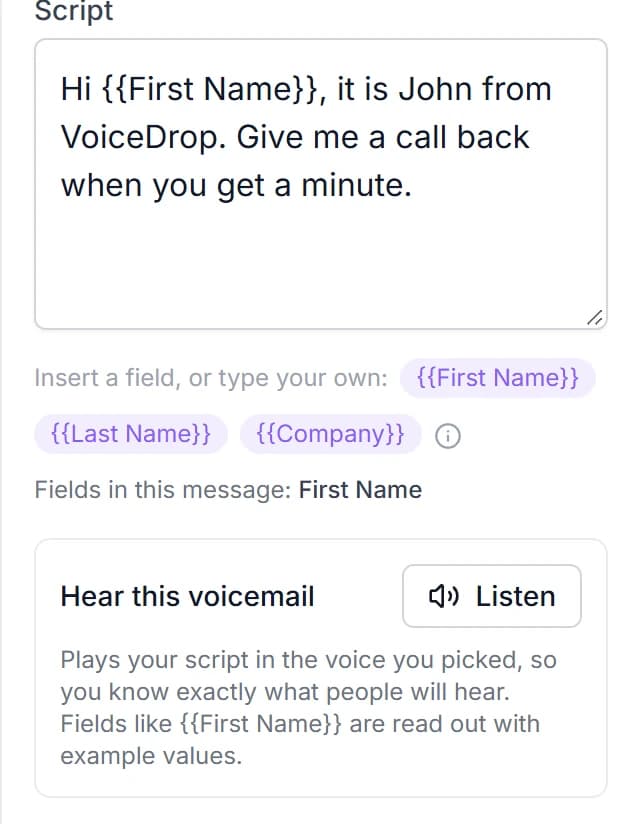
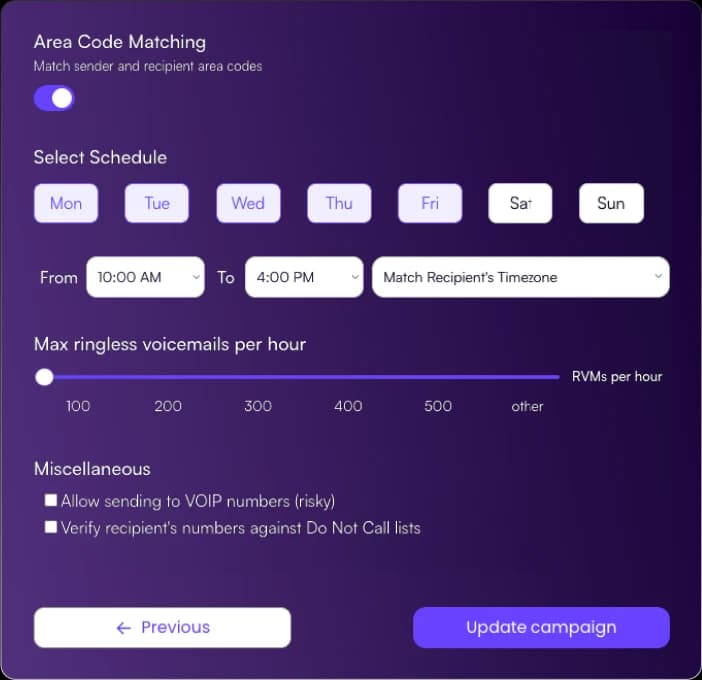
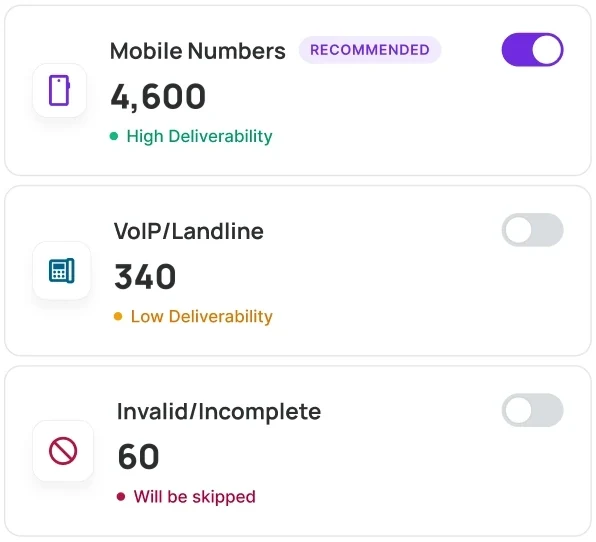
VoiceDrop gives a practice the tools a reminder campaign needs.
Every reminder goes out in your front desk's voice.
Clone a voice from a 20 to 90 second recording, or pick one of 37 ready-made voices.
Each patient hears their own name and visit time.
Merge any column from your file into the script, like a first name, an office or an appointment time.
You send from your own numbers.
Numbers you own are confirmed with a code, and you can rotate several on one campaign.
Reminders go out in each patient's local hours.
Pick the days and hours, from 7 AM to 11 PM, and VoiceDrop matches each patient's time zone.
Bad numbers are skipped before you send.
Every list is checked on upload and landlines are skipped. Send 100 or 1,000,000, with no daily cap.
You see what happened on every number.
Results come in plain words, delivered voicemails can be played back for 30 days, and results export to a spreadsheet.
Patients can call or text back, and your team answers.
Patients can confirm or reschedule by text, and your team answers from one shared inbox.
Follow a reminder voicemail with a text. Patients reply to confirm or ask for another time, your team answers in the same thread, and filters show who still needs a reply. Texting starts with its own signup and a short carrier registration form in the dashboard.
- Bulk texts with each patient's name in them
- Opt-outs and duplicate-send protection on every text
- Team assignments, so every reply has an owner
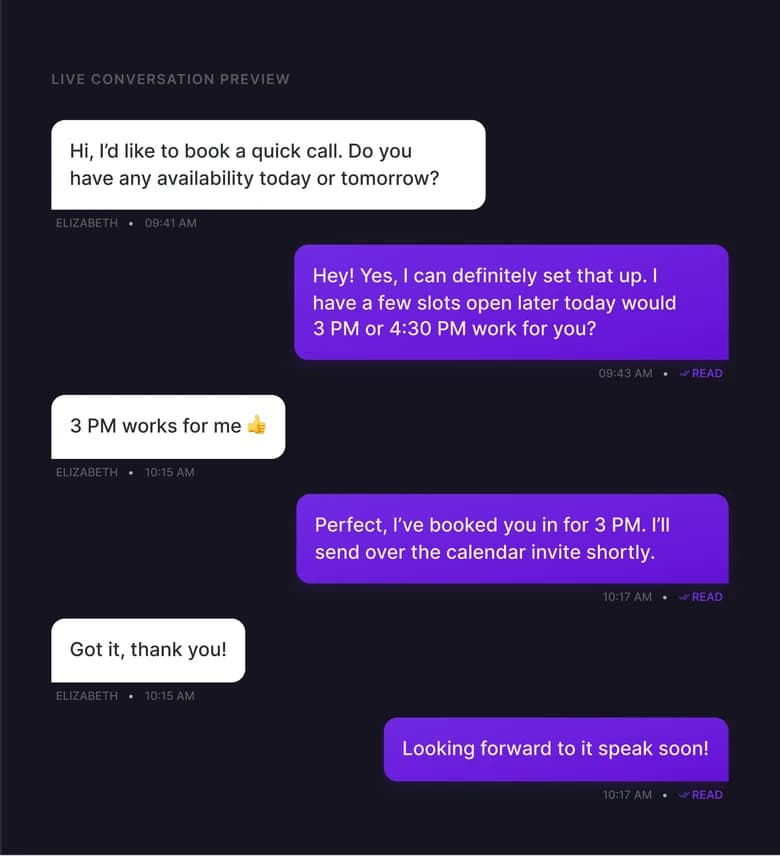
Patients who prefer to call reach your front desk, and you see which message they heard.
A ringless voicemail does not ring the phone, so the reminder never interrupts a patient at work. When a patient wants to talk, they call the number in the message. Calls to your VoiceDrop numbers forward to your team and are logged with the campaign each caller heard.
- Callbacks forward to a verified number, such as your front desk line
- Each call is logged with the campaign the caller heard
- Temporary failures are retried for you, so one failed attempt does not end the send
Consent, opt-outs and message content stay in your control.
VoiceDrop is made for messages to your own patients, who gave you their number and agreed to hear from you. Keep each message general: the patient's first name, the office name, the day and time, and a number to call. Leave the reason for the visit and any health details out of the recording and the text.
Your Do-Not-Call list is skipped on every send, and you can add numbers by hand, by file or by API. You pick the days and hours, from 7 AM to 11 PM, and VoiceDrop matches each patient's time zone. Before your first send, read are ringless voicemails legal and the TCPA guide. VoiceDrop is SOC 2 Type II compliant, and your contact data and voice recordings are encrypted in transit and at rest.
Here are answers to 6 questions about patient appointment reminders.
What is the best way for a clinic to send appointment reminders to many patients?
Send a short ringless voicemail in your front desk's voice with the patient's name and visit time, then follow with a text. The voicemail does not ring the phone, patients listen when it suits them, and calls and replies come back to your team.What should an appointment reminder voicemail say?
Keep it short and general: the patient's first name, the office name, the day and time, and one clear ask to call the office to confirm or change the visit. Leave out the reason for the visit and anything else about their health.Can patients confirm or reschedule by text?
Yes. VoiceDrop sends two-way texts, and patient replies land in one shared inbox your team can answer. Texting starts with its own signup and carrier registration, done in the dashboard.Does it work with our scheduling or practice management system?
Yes. Any system that exports a CSV works: upload the file and merge each patient's name and visit time into the script. HubSpot, Zapier and Make can automate the handoff, and anything else can send through the REST API.How do clinics send recall reminders to patients who are overdue?
Export the patients who are due from your system, upload the file and send one short message asking them to call and book their next visit. Follow with a text for patients who prefer to reply.Do reminder voicemails reach patients who only have a landline?
No. Ringless voicemail reaches mobile and VoIP numbers that can receive voicemail. VoiceDrop checks every list when you upload it and skips landlines, so those patients need another channel.

Start sending in minutes
Your Voice. Their Voicemail. At Scale.
Mass outreach in your own voice, minus the calls.
$20 free credits · ~200 voicemails · cancel anytime
- No long-term contract
- Cancel anytime
- Pay only for delivered voicemails