
GoHighLevel can send ringless voicemail drops, and VoiceDrop makes each one sound like you.
A voicemail drop in GoHighLevel is a workflow action that puts a recorded message in a contact's voicemail box without the phone ringing. Connect GoHighLevel to VoiceDrop and each drop can be read in your own AI voice, with the contact's name in it.
 GoHighLevel

GoHighLevel's built-in ringless voicemail is a workflow action that drops a recorded file into voicemail.
GoHighLevel, also written HighLevel, describes the feature in its own setup guide. The contact's phone does not ring, and no live conversation is needed. It works best for follow-ups, reminders and nurture steps sent to contacts who agreed to hear from you.
You add it as an action in a workflow.
Open Automation, then Workflows, choose the plus icon and pick Voicemail from the action list.
The message is a recording you upload.
The guide asks for an MP3 or WAV file prepared at 64 kbps, attached to the action.
The sub-account needs a number to send from.
The guide asks for an active LC Phone number or a number you have connected to the sub-account.
Consent comes first for every contact.
The guide says to use drops only for contacts who gave the consent that prerecorded or automated calls require.
GoHighLevelOne workflow, one recordingSource: GoHighLevel's own guide, Ringless Voicemail and Voicemail Drops setup guide, read on 16 November 2026.
GoHighLevel's drop plays one recording you upload, and VoiceDrop can speak to each contact in your voice.
You keep your GoHighLevel workflows. The workflow hands the contact to VoiceDrop, and VoiceDrop sends the voicemail.
| What is compared | connected to GoHighLevel | GoHighLevel's built-in drop |
|---|---|---|
| What plays in the voicemail | Your AI voice clone reads a script with the contact's first name in it, or a recording you already have plays. | A pre-recorded MP3 or WAV file you attach to the action. |
| The number it comes from | A number you verify in VoiceDrop, where callbacks arrive. | An active LC Phone number or one connected to the sub-account. |
| What you learn afterwards | Each send can post its delivery status to a webhook you choose. | The guide says delivery confirmation is not always available, and workflow history shows the trigger time. |
Your own voice reads every script.
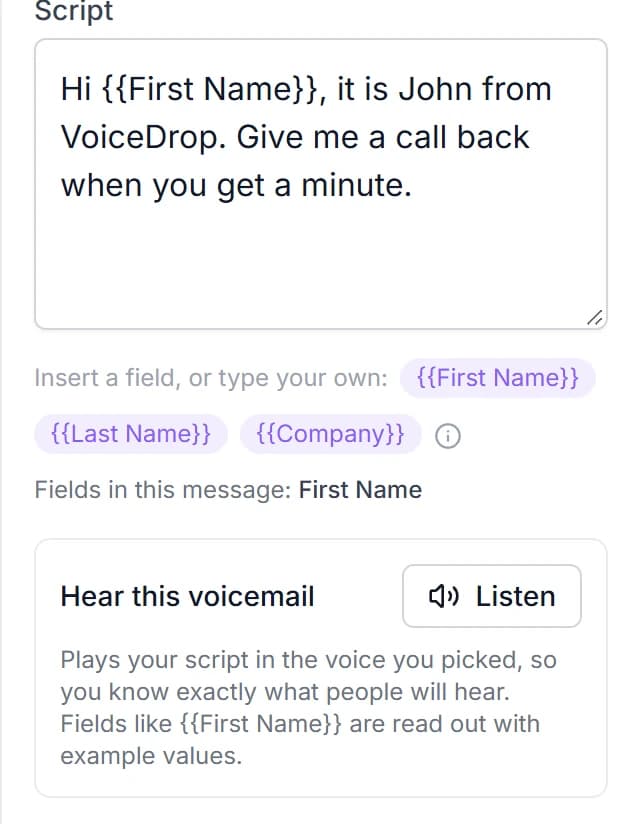
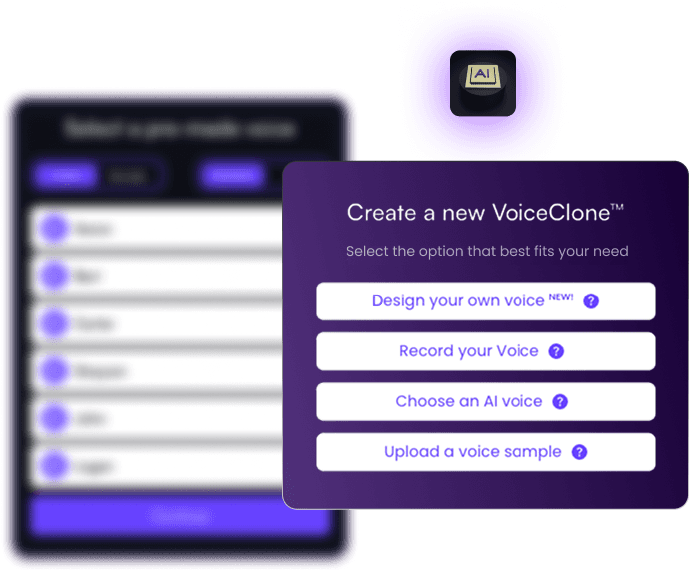
Create a voice clone once, and every voicemail sounds like you without a new recording.
The contact's name and fields go into the script.
Map the first name or any custom field from GoHighLevel, and each contact hears their own message.
Numbers can be validated and checked against do-not-call lists.
Turn the checks on before a voicemail goes out, so credits go to working lines.
You can connect GoHighLevel to VoiceDrop in five steps without writing code.
VoiceDrop connects to GoHighLevel through Zapier, Make or the VoiceDrop REST API. Here is the Zapier route, which needs no developer.
GoHighLevelA contact reaches a workflow step.
A pipeline move, tag, form or booking starts it.

Zapier catches the contact.
The Webhook action sends their name and phone.
VoiceDrop reads your script.
Your voice clone says it with their name.
The voicemail lands without a ring.
The contact sees a new voicemail, not a missed call.
Get your VoiceDrop account ready.
Create an account, add a voice clone and verify the number your voicemails come from. Then copy your API key from the dashboard.
Choose how GoHighLevel starts the Zap.
For pipeline moves, start with the LeadConnector trigger Pipeline Stage Changed. For a tag, form or booking, start with Webhooks by Zapier and copy its Catch Hook URL.
Send the contact from your GoHighLevel workflow.
Add a Webhook action to the workflow and paste the Catch Hook URL, so every contact who reaches that step goes to Zapier.
Add the VoiceDrop action to the Zap.
Pick Send an AI Voice RVM to have your voice clone read a script, or Send a Static Audio RVM to play a recording. RVM is short for ringless voicemail.
Map the phone numbers, then test on yourself.
Map the contact's phone to Phone (To) and your verified number to Phone (From). Run it with your own mobile number, listen, and switch it on.
 LeadConnector Trigger Action
Any GoHighLevel trigger can start a voicemail, from a pipeline move to a booked appointment.
Pipeline moves start the Zap directly. Every other workflow trigger reaches it through the Webhook action.
An opportunity that moves stage gets the next message.
A lead moved to a stage such as No Show hears a voicemail written for that moment.
A booked appointment gets a reminder in your voice.
Fire the workflow webhook from an appointment trigger and send a friendly reminder before the meeting.
A tag can start a reactivation drop.
Tag old leads you want back, and let the tag send them a voicemail that invites a reply.
“Hi Jordan, it's Sam. I saw you booked Thursday at 2, and I'm looking forward to it. Call me back if anything changes.”
A sample voicemail as the contact sees it.
GoHighLevel contacts can join a VoiceDrop campaign with sending hours, an hourly cap and a do-not-call check.
Use the Add Prospects action instead of a single send, and VoiceDrop spreads the voicemails out for you.
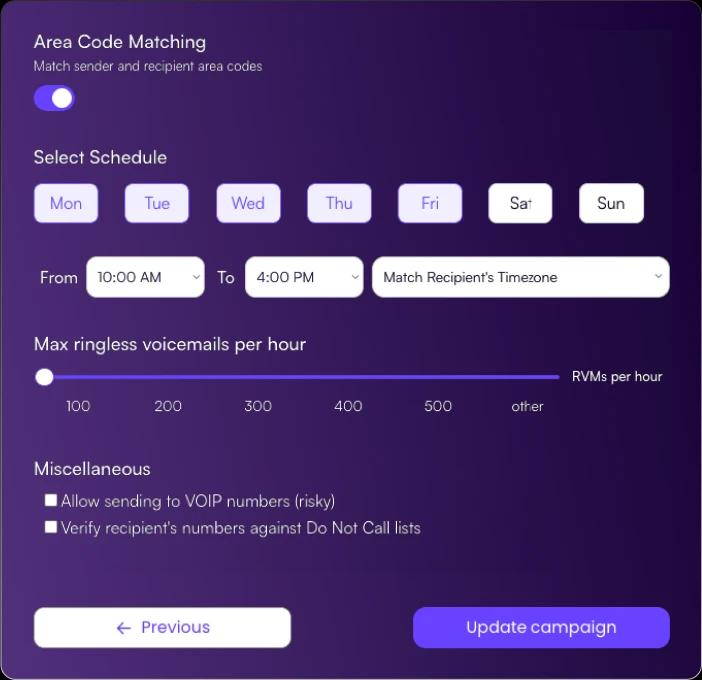
- Choose the days and hours voicemails go out, and match the contact's time zone.
- Cap how many go out each hour so a large batch spreads out over the day.
- Match your number to their area code so the sender's area code matches theirs.
- Check numbers against do-not-call lists before anything is sent.
Delivery status goes to a webhook you choose.
Both VoiceDrop voicemail actions in Zapier have a Send Status to Webhook field, so a second Zap can tag the contact in GoHighLevel.
Callbacks come to the number you verified.
When a contact calls back, the call reaches the number the voicemail came from, so your team can pick up.
These are the short answers to the questions people ask about voicemail drops in GoHighLevel.
What is a ringless voicemail drop in GoHighLevel?
A ringless voicemail drop in GoHighLevel is a workflow action that delivers a pre-recorded audio message straight to a contact's voicemail without ringing their phone. In the workflow action list it is called Voicemail.How do I set up a voicemail drop in GoHighLevel?
Open a workflow under Automation, then Workflows, add the Voicemail action, upload an MP3 or WAV recording at 64 kbps, and save. Then run the workflow on a test contact and listen to the result.What does GoHighLevel need before it can send ringless voicemail?
It needs an active LC Phone number or a connected number in the sub-account, a recording saved as MP3 or WAV at 64 kbps, a contact with a valid phone number, and the consent that prerecorded or automated calls require.Can I use VoiceDrop with GoHighLevel?
Yes. A GoHighLevel workflow passes the contact to VoiceDrop, and VoiceDrop sends the ringless voicemail in your own AI voice.How does VoiceDrop connect to GoHighLevel?
VoiceDrop connects to GoHighLevel through Zapier, Make or the VoiceDrop REST API. In Zapier, the LeadConnector trigger Pipeline Stage Changed can start the Zap directly, and any other GoHighLevel workflow trigger can start it through a Webhook action.Can the voicemail use my own voice and the contact's name?
Yes. The VoiceDrop action Send an AI Voice RVM has your AI voice clone read a script, and you can insert the contact's first name and other fields from GoHighLevel into it.Does the contact's phone ring when VoiceDrop sends a voicemail?
No. VoiceDrop sends a ringless voicemail, so the message goes straight to the voicemail box and the contact sees a new voicemail instead of a missed call.How do I know if a voicemail was delivered?
Both VoiceDrop voicemail actions in Zapier have a Send Status to Webhook field. Point it at a second Zap, and the delivery status can tag the contact in GoHighLevel.Do I need consent to send a voicemail drop?
Yes. Send drops only to contacts who agreed to receive prerecorded or automated messages, which is also what GoHighLevel's own guide says. The rules vary by location and use case.Does VoiceDrop have a free trial?
Yes. VoiceDrop has a free trial with credits to send your first voicemails, so you can test the GoHighLevel connection on your own phone first.
Start a VoiceDrop trial and send your first GoHighLevel voicemail in your own voice.
Create your account, clone your voice and connect GoHighLevel with Zapier or Make.