
Add a ringless voicemail drop to your Close CRM follow-up
Connect Close to VoiceDrop through Zapier, Make or the REST API, and a new lead, a Smart View or a new opportunity can drop a voicemail in your own cloned voice.


A Close CRM voicemail drop adds a voice touch without another dial.
A voicemail drop leaves a recorded message in a contact's voicemail box. VoiceDrop sends it as ringless voicemail, so the phone does not ring and the prospect listens when it suits them.
Close teams live in Smart Views and sequences. VoiceDrop slots in next to them: when a lead is created or newly lands in a Smart View you saved, the contact gets a short voicemail in your AI voice clone, and your reps spend their dials on the people who call back.
You can connect Close to VoiceDrop in three ways.
| Way to connect | How it works | Code needed |
|---|---|---|
| Zapier | A Close trigger such as New Lead in Smart View starts a VoiceDrop action | None |
| Make | A scenario with filters and branches passes the contact to VoiceDrop | None |
| REST API | Your own code sends each voicemail and gets its status on a webhook | A developer |
Set up a Close voicemail drop in six steps.
- 1
Get your VoiceDrop account ready.
Create a VoiceDrop account, add a voice clone, and verify the phone number your voicemails will come from. Then copy your API key from the VoiceDrop dashboard.
- 2
Create a Zap with Close as the trigger.
In Zapier, choose Close and an event such as New Lead, New Lead in Smart View or New Opportunity, then log in to Close.
- 3
Pick the contact phone to send to.
A Close lead can hold several contacts. Map the phone of the contact you want to reach, and add a Zapier filter if only some leads should get a voicemail.
- 4
Add the VoiceDrop action to the Zap.
Choose the VoiceDrop Zapier app and the action Send an AI Voice RVM to have your voice clone read a script, or Send a Static Audio RVM to play a recording you already have (RVM is short for ringless voicemail). Connect VoiceDrop with your API key. To send Close contacts through a scheduled campaign instead, use Add Prospects.
- 5
Map the phone numbers and write the script.
Map the contact's phone from Close to Phone (To) and your verified number to Phone (From). Then write the script and insert the contact's first name and the company from the Close trigger, so each voicemail speaks to one person.
- 6
Test it on yourself, then turn it on.
Run the Zap on a test lead with your own mobile number, listen to the voicemail, and switch the Zap on when it sounds right.
These Close triggers make good voicemail drops.
A new lead gets a voicemail on day one.
Use New Lead so every new lead hears a short intro before your first call.
A Smart View can decide who hears from you.
Use New Lead in Smart View with a view you saved, such as leads with no reply, and each new match gets a voicemail.
A new opportunity gets a thank-you and a next step.
Use New Opportunity so a fresh opportunity hears a voicemail that confirms what happens next.
This is what the VoiceDrop side of a Close voicemail drop looks like.
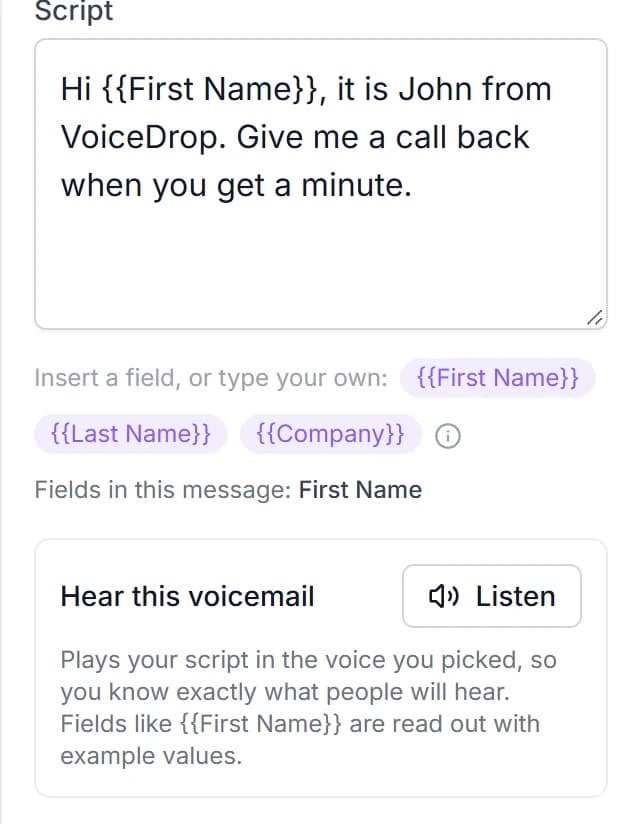
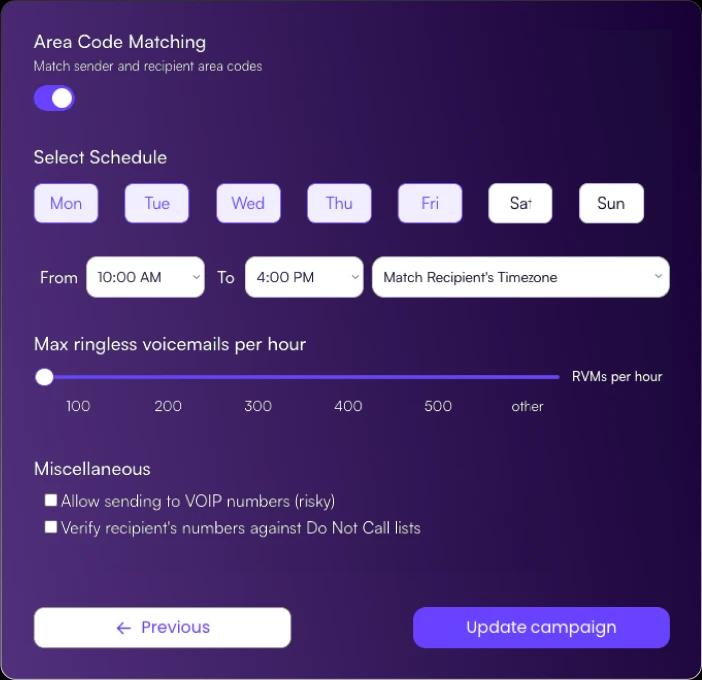
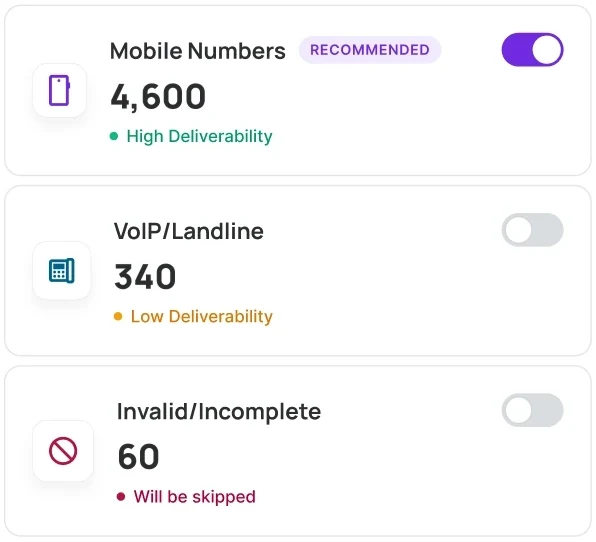
The result can be logged back in Close.
Both VoiceDrop voicemail actions in Zapier have a Send Status to Webhook field. Point it at a second Zap that catches the status and adds a note to the lead in Close, so your team can see in Close which contacts got a voicemail.
Callbacks come to the number the voicemail came from, the one you verified. VoiceDrop's AI Inbound Agent can also answer callbacks, qualify the caller and save the best time to call back. See pricing before you plan your first campaign.
Here are answers to common Close voicemail drop questions.
Add a voicemail drop to your Close follow-up.
Start a free trial or book a demo, then send your first Close voicemail drop to your own phone.