
What’s the best free voicemail app when you’re tired of missed calls, cluttered inboxes, and confusing voice messages? With so many apps claiming to offer smarter voicemail solutions, choosing the right one can feel overwhelming.
Some apps focus on voicemail transcription, others promise spam filtering, while a few aim to replace traditional carrier voicemail entirely. But not every free option delivers real value, and hidden limitations can quickly turn a “free” app into a frustrating experience.
Explore what a free voicemail app actually does, key features that matter most, and pros and cons of popular options. Then, you will confidently choose the best free voicemail app and finally take control of your voicemail experience.
Sending voicemails for a business instead? A consumer voicemail app manages the messages you receive — it won’t deliver campaigns at scale. For that you need a ringless voicemail app built for teams, which drops personalized voice messages straight into thousands of contacts’ voicemail boxes without ringing their phones.
What to Look for in a Free Voicemail App
When searching for a free voicemail app, it’s important to focus on features that improve usability, protect your information, and help you manage messages efficiently. Not all free options are created equal. So, knowing what to look for will help you find an app that truly enhances your voicemail experience instead of causing frustration or leaving gaps in functionality.
Security & Privacy Features
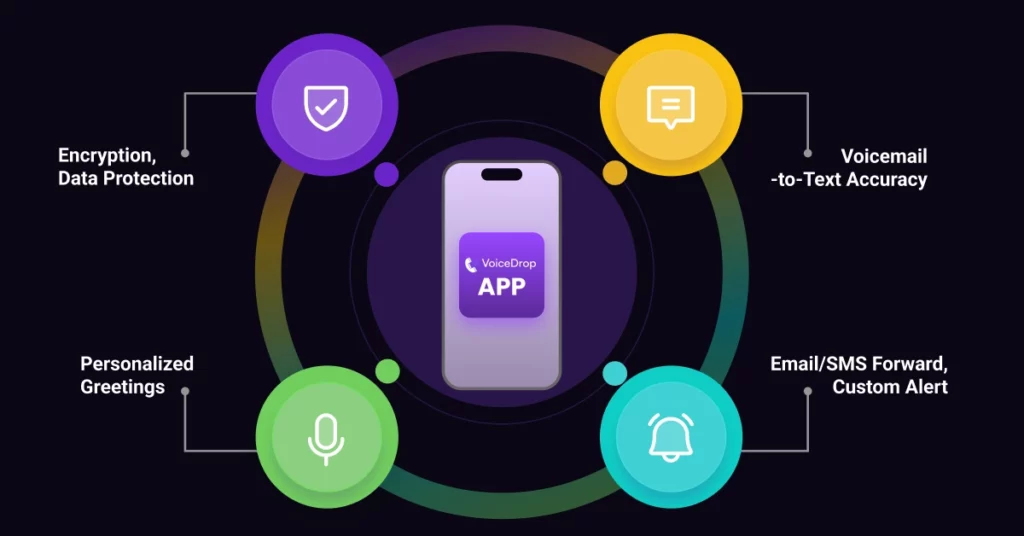
Your voicemail may contain sensitive information, so strong security and privacy are essential. Look for apps that offer secure login methods, like PIN or biometric access, encrypted message storage, and clear privacy policies. An app that respects your data and gives you control over permissions helps protect you from unauthorized access or misuse of your personal information.
Transcription Capabilities
Transcription turns your voice messages into readable text, which is great for quickly scanning messages without listening. While free apps may not offer perfect accuracy, the best ones provide clear and concise text transcriptions. This feature is especially helpful when you’re in a meeting, in noisy places, or managing many messages. Look for apps that support multiple languages and allow editing or copying of transcribed text. Use advanced AI automation for high-accuracy transcription. A reliable app instantly provides a clear, searchable text of every message.
Forwarding and Notification Options
Flexible forwarding and notification settings can greatly improve usability. A reliable voicemail app should notify you instantly when a new message arrives through push alerts, email notifications, or SMS. Forwarding options allow you to share voicemails with others or send them to another email address for record-keeping. These features are especially useful for professionals, small teams, or anyone who manages multiple numbers and wants to stay organized.
Custom Greetings and Personalization
Personalization features help your voicemail feel more professional and user-friendly. Custom greetings allow you to record different messages for work, personal calls, or specific situations like being on vacation. Some visual voicemail apps also let you organize messages, label contacts, or adjust playback settings. While free versions may limit customization, having at least basic personalization options can make a noticeable difference in how polished and effective your voicemail system feels.
VoiceDrop: Best for Business Voicemail Automation

VoiceDrop is a next-generation platform designed specifically for businesses and sales teams. It transforms the concept of voicemail from a passive inbox into an active business communication tool powerhouse. Unlike traditional voice messaging apps focused solely on receiving messages, VoiceDrop focuses on compliant, high-volume outbound outreach. While not a completely free consumer app, its inclusion is vital because it represents the highest tier of voicemail automation and scalability for professionals.
Features
VoiceDrop is a powerful AI-driven voicemail platform designed for sales teams. It enables automated, ringless voicemail drops that go directly to the recipient’s inbox, personalized with AI voice cloning and dynamic tags. With deep CRM integration, including Salesforce, and robust campaign analytics, VoiceDrop allows businesses to track performance and optimize outreach. This ringless voicemail tool is ideal for high-volume, compliant delivery. It serves as a complete AI automation solution for modern sales communication.
Pros
VoiceDrop delivers high engagement and callback rates because its messages are non-intrusive and personalized. It is a time-saving automation tool, eliminating manual dialing for follow-ups and lead generation. The platform is highly scalable for large campaigns, making it a fantastic business voicemail solution. It dramatically improves sales follow-ups by ensuring the message is delivered, logged, and tracked within your existing systems.
Cons
VoiceDrop is primarily a subscription-based platform designed for professional outreach. It offers limited free options for casual users or simple inbox management. The app’s full benefit requires initial setup and optimal CRM integration to maximize its outbound automation capabilities. It is not intended to replace basic, carrier-provided visual voicemail for personal message retrieval.
YouMail: Popular for Personal and Business Use
YouMail is a highly regarded voice messaging app known for its exceptional spam-blocking capabilities and robust Features. It serves both individual users tired of robocalls and spam and small businesses needing a professional, organized message management system. It offers some of the best security features available in the market.
Features
YouMail provides reliable voicemail-to-text transcription, an excellent visual voicemail interface, and advanced spam blocking that protects users from known telemarketers and scammers. It allows for personalized greetings that can change based on the caller, such as playing an “out of service” message to a blocked number. This provides a clean Customer Experience.
Pros
YouMail is very easy to use and offers strong spam call protection, which is vital for maintaining a clear inbox. This app works well across both iOS and free voicemail apps for Android devices, providing Multi-device voicemail support. Its personalized defense against spam calls is a key differentiator. It helps users reduce unwanted voicemail notifications.
Cons
The free version of YouMail has ads, which can be disruptive for heavy users. Without upgrading to a premium plan, users experience limited advanced features, such as extended message storage or certain forwarding options. The free transcription allowance is also typically capped.
Google Voice: Best Free Option for Voicemail Management
Google Voice is often hailed as the best truly free option available, especially for individuals or solopreneurs looking for efficient voicemail management. It provides a secondary phone number and seamless integration with the massive Google ecosystem. This makes it a popular choice for free voicemail apps for Android and cross-platform users. If a second phone number is the only reason Google Voice is on your list, a disposable US number that forwards to the phone you already carry covers that job on its own.
Features
Google Voice offers high-quality voicemail transcription, which is one of its strongest features. It provides call forwarding to multiple linked devices and reliable voicemail notifications. Its best advantage is the deep CRM integration with the Google ecosystem (Gmail, Calendar). This allows easy management of calls and messages directly from a desktop or email interface.
Pros
Google Voice is reliably free, providing a stable, reliable service. It offers excellent cross-platform compatibility and a simple, intuitive setup process that appeals to a wide range of users. The service’s longevity and Google’s backing assure stability and security. Its transcription service is generally fast and reliable for basic messages.
Cons
Google Voice lacks the advanced, high-volume voicemail automation Features needed for complex marketing campaigns. Its transcription may not always be accurate for fast speech or complex jargon. Furthermore, while great for management, it doesn’t offer the robust outbound features necessary for a true Business voicemail Call follow-up tools solution.
HulloMail: Best for Mobile Users
HulloMail is designed with the mobile user in mind, offering a clean, simple interface and focusing on making voicemail access easy and visual. It is a strong competitor in the free voicemail apps for iPhone market.
Features
HulloMail provides a visual voicemail interface, allowing users to scroll through messages visually. It includes voicemail backup features and transcription services. HulloMail also has basic call management system features. This app aims to simplify the process of checking messages, providing a quick summary of the caller and the message.
Pros
HulloMail offers an easy mobile interface and supports multiple carriers, which is a key advantage for users who switch providers. Its customizable voicemail alerts help users prioritize messages, making it an effective way to manage personal Voice messaging apps. The visual organization makes message management far less tedious.
Cons
The free plan for HulloMail is limited in message storage and retention. Users often find that transcription accuracy can vary more widely compared to Google Voice or YouMail. It is a solid choice for personal use, but it does not scale well to meet the demands of business voicemail or voicemail automation requirements.
InstaVoice: Best for Multi-Device Use
InstaVoice is excellent for users who manage multiple phone numbers or devices. It is a unified voice messaging app solution that caters particularly well to travelers and professionals needing multi-device voicemail access.
Features
InstaVoice offers unified voicemail across multiple devices, which is its standout feature. It provides missed call alerts, reliable voicemail-to-text transcription, and even basic messaging features. InstaVoice is designed to act as a central hub for all voice and call follow-up tools notifications. This is particularly useful for people using separate lines for personal and business use.
Pros
InstaVoice provides great multi-device support, integrating calls and messages seamlessly across all your numbers. It is a strong solution for frequent travelers who need reliable voicemail alerts regardless of location. The unified inbox simplifies communication flow, making it a powerful business communication tool for small teams.
You can find more details about InstaVoice’s features on their website.
Cons
The free plan is limited in advanced features. It often requires an upgrade for crucial tools like expanded message retention. For some users, the integrated calls and messaging interface may feel cluttered or overly complex compared to simpler apps like Google Voice.
Tips on How to Choose the Right Voicemail App
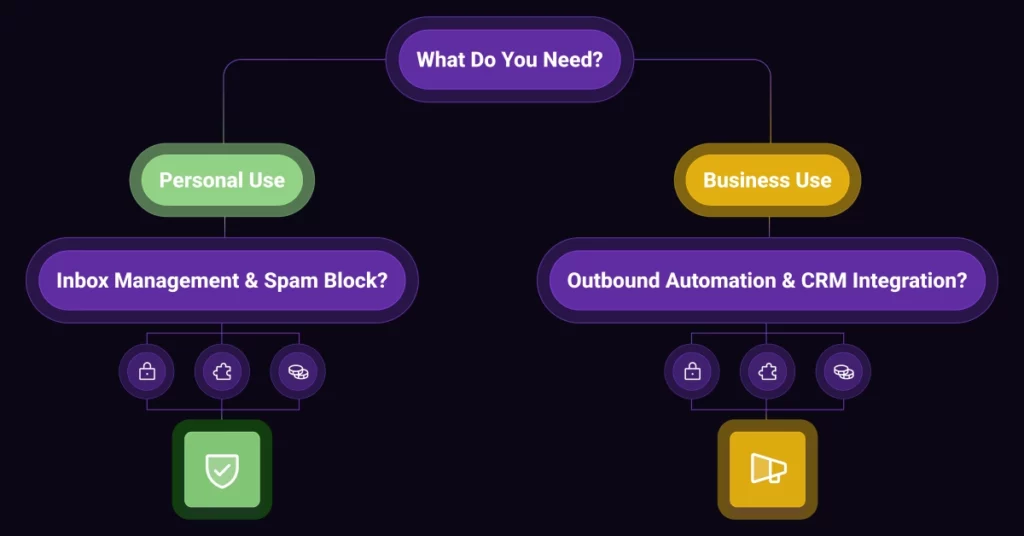
Selecting the right voicemail app requires careful consideration of your needs and budget. Do not choose an app just because it is free. Use this guidance to make an informed decision for your business voicemail needs or personal use.
- Ease of Use vs. Features: For personal use, prioritize ease of use and security. For business, prioritize automation features and CRM integration.
- Device Compatibility: Ensure the app works flawlessly on your specific free voicemail apps for Android or free voicemail apps for iPhone. Check if it supports multi-device voicemail if you use a work and personal line.
- Pricing Tiers: Always understand the limitations of the free version and what the paid upgrade unlocks. A “free” app may become unusable due to feature limitations.
- Integration with Other Tools: If you are a business, choose an app that offers CRM integration, like VoiceDrop. This turns the app into a powerful call follow-up tool solution, logging activity automatically.
- Security & Privacy: Never compromise on security. Choose an app with verifiable encryption, especially if handling client data.
Next Steps
Choosing the right voicemail app can significantly improve your productivity, engagement, and communication efficiency. For personal users, apps like YouMail and Google Voice offer excellent features for managing incoming messages and blocking spam. They provide reliable voicemail transcription apps for easy message reading.
For small businesses and sales professionals, however, the real gain is found in voicemail automation. Tools like VoiceDrop specialize in personalized voicemail drops and business communication tools. They focus on outbound efficiency and call follow-up tools that scale. If your goal is to automate outreach and boost sales, the best “next step” is to explore VoiceDrop for compliant, scalable voicemail automation.
Ready to move beyond basic voicemail and start generating leads with automated voice outreach? Don’t let your important messages get lost in the noise.
Click here to schedule a demo and discover how VoiceDrop can transform your business communication and sales efficiency.
FAQ’s
What is the best free voicemail app for businesses?
VoiceDrop is ideal for business voicemail automation, offering personalized voicemail drops, AI automation features, and Security compliance, making it the top choice for outbound-focused teams.
Can I use free voicemail apps for personal calls?
Yes, apps like YouMail and Google Voice are great for managing personal voicemails efficiently, providing reliable voicemail transcription apps and multi-device voicemail support.
Do these apps offer voicemail transcription?
Most top apps, including VoiceDrop, YouMail, and Google Voice, provide transcription, which is a key feature for easier message reading.
Are free voicemail apps secure?
Leading apps implement encryption and privacy measures to provide security, but users should always check individual app policies and understand how their data is handled.
Can voicemail apps integrate with other tools?
Many apps, especially VoiceDrop, offer seamless CRM integration with sales and marketing tools for streamlined workflows and enhanced call follow-up tools.