
The “No-Code Wars” are officially heating up, and for high-volume sales teams, a clear winner is emerging. While Zapier has long been the default entry point for automation, a seismic shift is underway among advanced users tired of hitting technical ceilings.
Consequently, sales operations managers are increasingly migrating their critical voice flows to Make (formerly Integromat) to unlock better logic, lower costs, and true scalability. If you are serious about automation, it is time to choose a side.
The “Growth Tax”: Why Scaling Sales Teams Outgrow Zapier
It starts innocently enough. You build a simple “Zap” to send a notification when a lead comes in, and it works perfectly. However, as your sales team scales to “Hormozi-level” volume, you begin to encounter what experts call the “Growth Tax.”
The “Growth Tax” is the point at which the tool that helped you start becomes the obstacle to scaling. While Zapier is fantastic for beginners with linear workflows, it effectively penalizes success with high costs and rigid structures.
When you are processing thousands of leads per day, paying a premium for simplicity no longer makes sense. Therefore, rapidly expanding teams inevitably look for a platform that rewards volume rather than taxing it.
Big 3 Feature Battle: Logic, Routing & Error Handling
For a Sales Ops manager, the choice between automation platforms isn’t about brand loyalty; it is about performance. To understand why power users are switching, we must break down the comparison into three critical pillars: Cost, Visual Logic, and Stability.
The Cost of Success
The most immediate difference lies in how these platforms bill you. Zapier charges per “Task,” meaning every action in your workflow counts as a credit.
For example, if you have a 10-step follow-up sequence, that is 10 tasks per lead. For a high-volume outreach campaign, this can get incredibly expensive very quickly.
In contrast, Make charges per “Operation,” which is significantly cheaper at scale. This pricing model allows you to build complex, multi-step workflows without constantly worrying about your monthly bill.
You can review the current Zapier Pricing Structure to see just how quickly the costs for “Company” plans ramp up compared to Make’s robust enterprise offerings.
The Complexity Ceiling
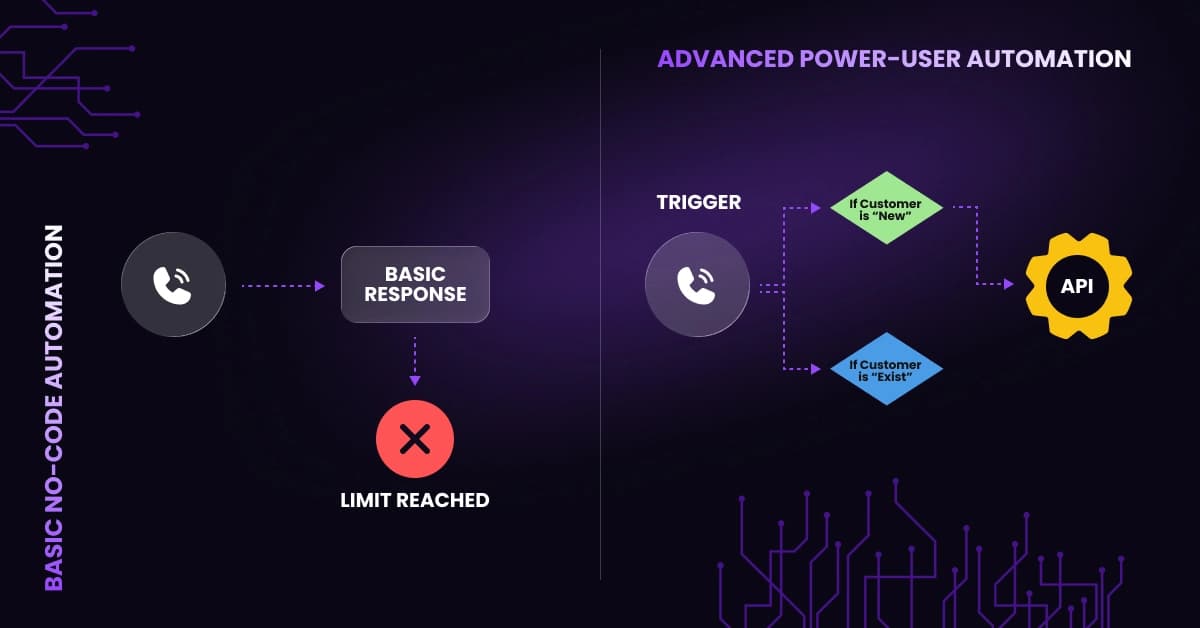
Sales processes are rarely a straight line. A lead might need to be routed differently based on their region, deal size, or lead score.
Unfortunately, Zapier forces you into a vertical, linear list format (Step 1 > Step 2). Attempting to build branching logic often requires creating “Paths,” which can quickly become messy and expensive.
Make, on the other hand, uses a visual canvas that resembles a flowchart. This interface allows you to drag, drop, and branch workflows in any direction. Because sales data is messy, this visual freedom is essential for advanced routing.
The “Resume” Function
Technology is imperfect, and sometimes your CRM or 3rd-party tools go offline. When this happens in Zapier, the Zap often simply fails and stops, potentially causing you to lose a high-value lead forever.
Make solves this with superior error-handling directives, specifically the “Resume” function. If a module fails because a service is temporarily unavailable, Make can “store” the data and automatically retry the operation once the connection is restored. This ensures that no lead is left behind due to a momentary technical glitch.
VoiceDrop Guide: Step-by-Step Automated Outreach with Make API
Theoretical comparisons are useful, but practical implementation is where the money is made. Let’s look at how to build a robust Ringless Voicemail campaign using Make’s API capabilities.
Triggering the Drop
The first step is setting up the trigger. Instead of manually uploading lists, you can set Make to “watch” your CRM for specific changes. For instance, you can configure the system to immediately initiate an outreach sequence when a prospect’s status changes to “New Lead” or “Stalled.”
By connecting your tools this way, you remove human latency from the equation. To see which platforms best fit this workflow, explore the available VoiceDrop Integrations that enable seamless data transfer.
The module-level detail sits on the VoiceDrop and Make integration page: which module to add, where the API key goes, and which fields to map before the scenario runs.
Filter Step: Prevent Waste with Logic Nodes
One of the most powerful features in Make is the “Filter” node. Situated between your Trigger and your Action. You can set up a visual gate that checks the data before proceeding.
For example, you can configure a filter to stop the workflow immediately if a phone number is missing or contains the wrong number of digits.
Consequently, you ensure that you never waste a VoiceDrop credit on a bad lead. This level of granular control is much harder to visualize and implement in a linear Zapier list.
Data Hygiene and Cost Optimization Strategies
Because Make is more affordable per operation, it opens up new possibilities for data hygiene. You can afford to add “Cleaning Steps” to your workflow, which would be prohibitively expensive under Zapier’s task-based model.
Validating Numbers Before Dialing
Sending ringless voicemails to landlines is a guaranteed way to waste money since they cannot receive the message. To solve this, savvy marketers integrate a validation step. You can use 1Lookup within your Make scenario to ping the API and check if a number is a mobile or landline before the voicemail is sent.
If the number is a landline, the workflow stops. If it is mobile, it proceeds. This simple step can save thousands in wasted credits over time. For accurate validation, we recommend using a dedicated data hygiene tool like 1Lookup.
Why Make’s Pricing Favors Essential Data Cleaning
In Zapier, adding a validation step like the one described above adds an extra “Task” for every lead. If you are processing 10,000 leads, that is 10,000 extra tasks you have to pay for, just to clean your data.
Conversely, on Make, this consumes an “Operation,” which costs a fraction of a penny. This pricing structure actively encourages better data habits because it doesn’t financially punish you for adding necessary quality-control steps to your automation.
🛑 Stop Wasting Credits on Dead Numbers. Before you automate your outreach, make sure you are only targeting valid mobile phones. Verify Your Lead List for Free at 1Lookup. 1Lookup is built by the same team as VoiceDrop.
Advanced Sales Tactics for Power Users

Once you have mastered the basics, Make allows you to deploy advanced strategies that give you a competitive edge.
Round-Robin Lead Assignment Without Costly Extensions
Fairly distributing leads among a sales team is a common headache. In Zapier, achieving a true “Round Robin” assignment often requires complicated workarounds or paid third-party extensions.
Make handles this natively. You can use its built-in math and array functions to count the number of active reps and distribute incoming leads evenly (Lead A to Rep 1, Lead B to Rep 2, etc.). Therefore, every salesperson gets their fair share of opportunities without needing extra software.
Multi-Path Follow-Up Sequences
Finally, Make excels at “Omnichannel” orchestration. You can build a single scenario that handles multiple communication channels simultaneously.
Imagine a workflow where the system sends a VoiceDrop, waits exactly 5 minutes, and then follows up with a text message.
By stacking Mass Text Messaging on top of your voice campaigns, you ensure your prospect sees your message.
Conclusion
Zapier is an excellent tool for starting, but Make is required for scaling. While the learning curve is slightly steeper, the benefits in cost savings, visual logic, and stability are undeniable.
If you are serious about handling volume and building a sophisticated sales engine, you need the platform that best handles complexity. Ultimately, power users choose power tools.
VoiceDrop runs on both, so this is a choice about how you want to build rather than about what you can send: start with the VoiceDrop Zapier app, or go straight to VoiceDrop inside a Make scenario.
Ready to build your own advanced voice flow? Start Your Free Trial today and experience the power of automated outreach.
FAQ’s
Is Make.com significantly harder to learn than Zapier for a non-technical sales manager?
It has a steeper learning curve initially, but the visual interface makes it intuitive once the basics are understood. Unlike Zapier’s rigid lists, seeing your workflow mapped out visually often helps non-technical users better understand the logic.
Which tool handles API responses better for tracking successful voicemail deliveries to the CRM?
Make is superior here as it allows you to parse the JSON response from VoiceDrop and update your CRM with the exact delivery status. This capability is often cited in Make vs Zapier Reviews as a key differentiator for power users who need detailed reporting.
Can I import my existing Zapier workflows directly into Make to save time?
No, you must rebuild them. However, this is often an advantage as it allows you to optimize and simplify the logic during the process. Most users find that multiple fragmented Zaps can be consolidated into a single, cleaner Make scenario.
