
How To Leave a Voicemail Without Calling on Android
The Phone app always rings them first. Here are the ways that work on an Android phone, and the one that never rings for a whole list.
A voicemail that arrived without a ring, on an Android phone.
How to leave a voicemail without calling on Android
Not from the Phone app, which always places a call. Here is what works on Android instead.
To reach one person from your Android
- Send a voice message in Google Messages: tap the microphone, record, then send. It arrives as a message, not a voicemail.
- For a real voicemail, call a dial-in voicemail service, enter their mobile number and record your message into their box.
- Skip *67: it only hides your number, and their phone still rings.
Voice messages: Google Messages Help. *67: the Verizon, AT&T and T-Mobile support pages.
Every way compared: how to leave a voicemail without calling.
To reach a list, use ringless voicemail
- 1Record it once. Say your message, or clone your voice from a 30-second sample.
- 2Add the numbers. Upload a CSV or sync your CRM. Every number is checked first.
- 3Send. It lands as a normal new voicemail. Their phone never rings.
Every new VoiceDrop account gets $20 in free credits.
Only ringless voicemail skips the ring for a whole list
| Method | Where it lands | Works for | Does their phone ring? |
|---|---|---|---|
| VoiceDrop ringless voicemail | Their voicemail box | One contact or a list of thousands | No, and no missed call |
| A voice message in Google Messages | Their text thread | One person or a group chat | No, it is a message |
| A dial-in voicemail service | Their voicemail box | One person at a time | Usually not |
| *67 before the number | A normal call | Hiding your caller ID | Yes, it still rings |
Voice messages from Google Messages Help. *67 behavior from the Verizon, AT&T and T-Mobile support pages.
A normal call rings the phone first, and ringless voicemail skips that step
A normal call
- You dialYour call goes to their phone.
- Their phone ringsThey are interrupted, or they miss it.
- Missed call, then voicemailThey see a missed call next to your message.
Ringless voicemail
- VoiceDrop sendsYour recording goes out to every number on the list.
- No ringThe handset is never dialed, so nothing rings.
- New voicemailA normal new-voicemail alert, with no missed call.
That one skipped step is why the recipient never hears a ring and never sees a missed call.
Android has no built-in way to leave a voicemail without calling
Every call from the Phone app rings the other phone first. Voicemail only answers when they don't pick up, so they see a missed call next to your message. That is true on every Android phone, whichever company made it.
For one person there are two routes. A voice message in Google Messages is the quickest, but it lands in their text thread, not their voicemail. A dial-in voicemail service records straight into their voicemail box, one number at a time.
For a list, ringless voicemail delivers the same recording to every number at once, and each phone just shows a new voicemail.
Here is what a whole list looks like in VoiceDrop, from Chrome on your phone or computer.
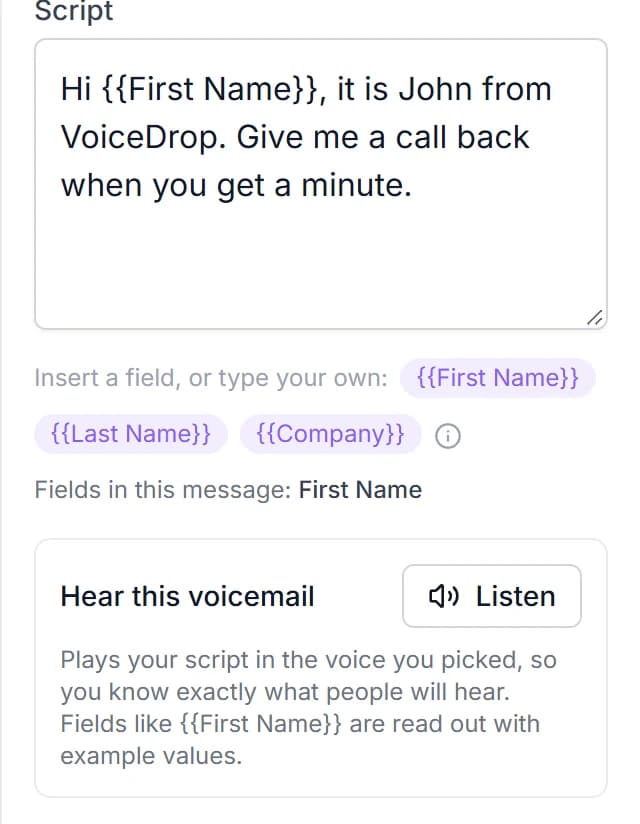
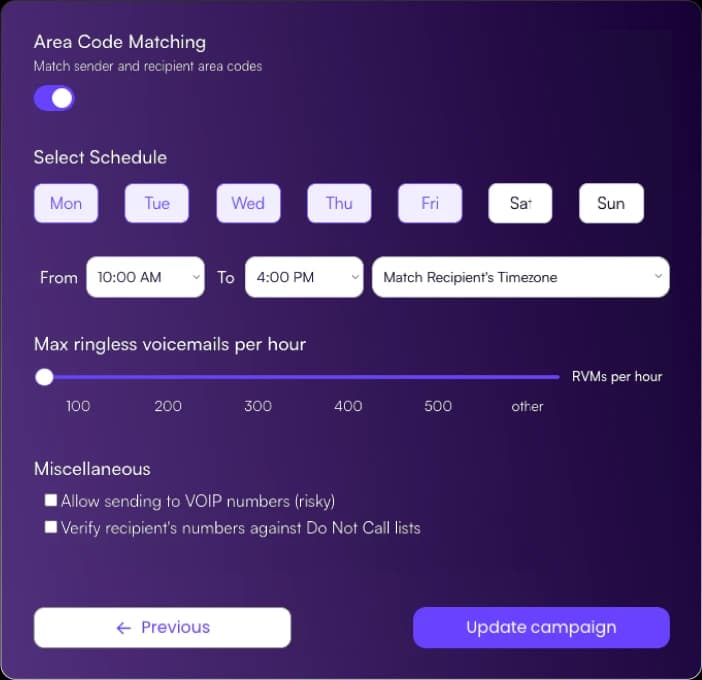
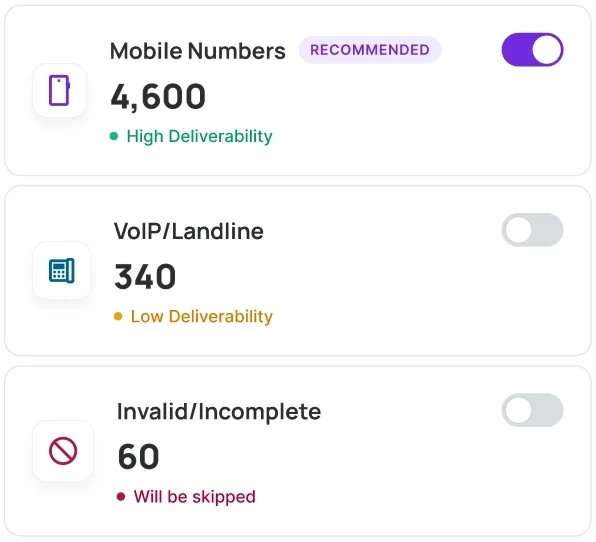
You can send ringless voicemail from an Android phone in three steps
Step 1: open VoiceDrop in Chrome and record your message, or clone your voice from a 30-second sample. Merge each contact's first name into the script so every voicemail sounds personal.
Step 2: upload a CSV or sync your CRM. Every number is checked, and Do-Not-Call lists are scrubbed before anything goes out.
Step 3: pick the sending hours and send. Each voicemail lands as a normal new voicemail, and you pay only for the ones delivered. Replies can come back as texts in one shared inbox.
Frequently Asked Questions
Send your first 200 voicemails free
Works from any browser, Android included. No contracts, pay only for delivered voicemails.