


Stop Being a “Copy-Paste” Robot.
If you are an SDR in 2026, you know the drill: You spend four hours manually sending connection requests, pasting the same generic InMail, and praying for a reply. The result? “SDR Burnout” and a pipeline that looks like a ghost town.
Manual outreach isn’t just boring; it’s a career killer. The top 1% of SDRs have stopped typing. They have become “Stack Pilots,” orchestrating sophisticated workflows that run while they sleep. This article isn’t just about LinkedIn tools; it’s about building an automated, multichannel engine that forces prospects to pay attention.
Why “Just LinkedIn” Is No Longer Enough
LinkedIn is the new email, crowded, noisy, and full of spam. Decision-makers have developed “Inbox Blindness,” automatically filtering out anything that looks like a pitch. Relying on LinkedIn alone is no longer a strategy; it’s a gamble.
The data is brutal:
- Email Only: ~2.3% reply rate.
- LinkedIn + Email + Phone: 14.2% reply rate.
To survive in 2026, you must be Omnipresent. You need to appear in their email, their LinkedIn notifications, and their voicemail simultaneously. This “Surround Sound” effect makes it impossible for you to ignore.
What Defines a “Safe” Automation Tool?
The biggest fear with automation is getting banned. The secret to safety lies in Cloud-Based vs. Browser-Based tools.
- Browser Extensions (Risky): These live in your Chrome browser and inject visible code. LinkedIn can spot them from a mile away. Avoid these.
- Cloud-Based (Safe): These run on dedicated servers with unique IP addresses. They mimic human behavior, including random delays, sleep intervals, and realistic clicking patterns.
Rule of Thumb: Always stay within the LinkedIn Commercial Use Limit. Automation scales your reach, but it doesn’t permit you to spam.
Category 1: The “All-in-One” Titans (Email + LinkedIn)

For teams that want a “single source of truth,” all-in-one platforms are the ideal solution. These tools handle data sourcing, email, and LinkedIn tasks in a single dashboard.
Some all-in-one platforms are built around a massive contact database. The most useful ones add “Buying Intent” signals, so you can filter for companies that are actively hiring or searching for your solution and instantly add them to a sequence.
Pro Tip: Even the biggest databases have gaps. If a prospect lacks a direct dial, don’t give up. Use deep skip-tracing to uncover their mobile number instantly. 👉 Find Verified Mobile Numbers with 1Lookup. 1Lookup is built by the same team as VoiceDrop.
Reply.io (AI-Driven Engagement)
Reply.io takes automation a step further with its “Jason AI” assistant. This tool doesn’t just send messages; it can handle basic replies and even automatically schedule meetings. Moreover, its multichannel sequences are intuitive, allowing you to seamlessly weave LinkedIn steps into emails and calls.
Category 2: The Specialized LinkedIn Automation Experts
Sometimes you need a tool that focuses exclusively on LinkedIn’s nuances. These platforms often offer advanced safety features and complex workflows, and they usually integrate with a separate CRM.
Dripify (Visual Workflows)
Dripify is an excellent choice for visual learners who want to see their strategy mapped out. You can create “drip” campaigns with specific logic. For instance, you can set a workflow that views a profile, waits one hour, and then sends a connection request.
If the prospect doesn’t accept, the system can automatically withdraw the request after a set number of days to keep your queue clean.
PhantomBuster (The Growth Hacker’s Choice)
For those who want to get technical, PhantomBuster offers powerful scraping capabilities. Significantly, it can extract attendee lists from LinkedIn Events, which are a goldmine for SDRs seeking high-intent leads.
You can scrape these audiences and then feed them into your other outreach tools. To see how these platforms compare in user satisfaction, you can check the latest G2 Sales Engagement Reviews.
The “Pattern Interrupt”: Adding VoiceDrop to Your Stack
You now have the automation tools to send connection requests, but how do you get prospects to actually respond? This is where the “Pattern Interrupt” comes into play. You need to break the cycle of text-based noise.
VoiceDrop allows you to add a human voice to your digital automation. While your LinkedIn bot is sending a connection request, VoiceDrop can simultaneously drop a ringless voicemail directly to the prospect’s mobile phone.
Psychologically, a voicemail feels personal, urgent, and human. It cuts through the digital clutter of text-based InMails and emails. By adding this layer, you create a “Surround Sound” effect that makes you look highly professional and persistent without being annoying. This is the core effective strategy behind Ringless Voicemail Marketing.
- Crucial Step: You cannot leave a ringless voicemail without the prospect’s cell phone number. Before launching your VoiceDrop campaign, ensure your LinkedIn data is enriched with accurate mobile contacts. 🔗 Get 100% Accurate Contact Data with 1Lookup
The Ultimate Multichannel Workflow (Step-by-Step)
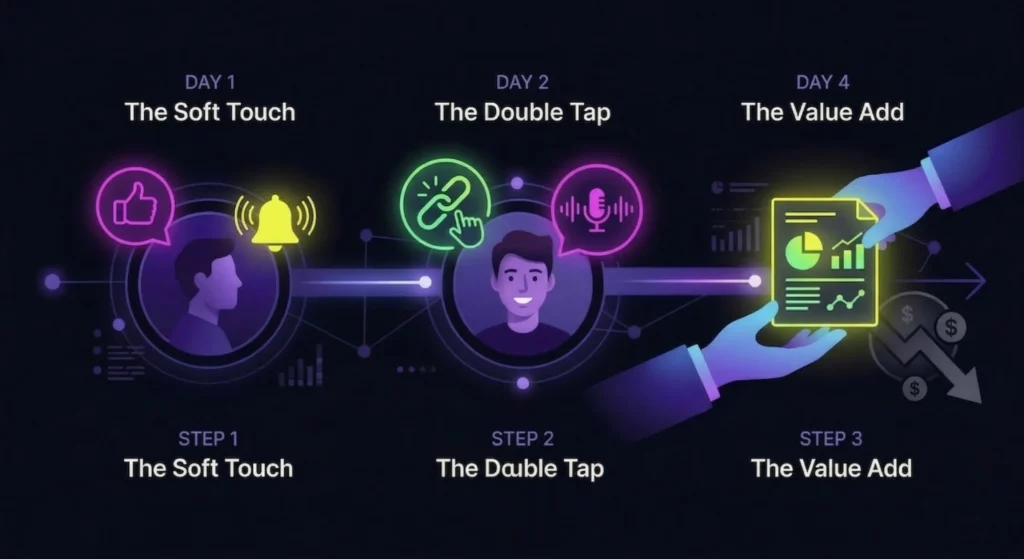
To get the best results, you shouldn’t just buy tools; you need a recipe for how to use them together. Here is a proven workflow to scale your pipeline.
Day 1: The “Soft Touch” (Automation)
Start by warming up the prospect. Use Dripify or PhantomBuster to auto-view the prospect’s profile and “Like” their most recent post. Importantly, do not pitch them yet. This step simply puts your face and name in their notifications, creating a moment of recognition.
Day 2: The “Double Tap” (Hybrid Attack)
This is where the magic happens. You hit them on two channels within minutes of each other.
- The Connection: Send a friendly, low-pressure LinkedIn connection request. (No pitch yet!)
- The Voice: Simultaneously, trigger a VoiceDrop voicemail.
- Script: “Hi [Name], it’s [Your Name]. I just sent you a connection request on LinkedIn regarding [Topic]. I wanted to put a voice to the face, so I’m not just another stranger in your inbox. Check it out when you get a second.”
Why It Works: When they check their phone and see a missed voicemail and a LinkedIn notification from the same person, you instantly become a “real” person, not a bot.
Day 4: The “Value Add” Follow-Up
If they accept the request but haven’t replied to the voicemail, use your automation tool to send a follow-up message. However, avoid hard selling. Instead, send a relevant case study or a helpful resource. You want to position yourself as a consultant, not a pest.
Advanced Integration: Connecting the Dots
The magic happens when these tools talk to each other. By using Zapier, you can create a fully automated ecosystem.
For example, you can set up a workflow where a “New Connection” in Waalaxy or Dripify acts as a trigger. This trigger then initiates a specific “RVM Campaign” in VoiceDrop. This ensures that as soon as someone enters your professional network, they receive a personal audio touch without you lifting a finger. For a detailed walkthrough on setting this up, visit our VoiceDrop Integrations page.
Measuring Success: Metrics That Matter
As a “Pilot” of your tech stack, you must watch your instruments. It is vital to remember that “Activity” does not equal “Results.”
Acceptance Rate vs. Reply Rate
You should track these two metrics separately to diagnose issues. A low acceptance rate usually means your LinkedIn headline or profile picture needs work. Conversely, a low reply rate suggests your messaging or your lack of a human voice is the problem.
The “Multichannel Lift”
Finally, track the “Lift” provided by your new tools. Compare the booking rates for leads who received only LinkedIn messages with those who received the LinkedIn + VoiceDrop combo. According to the Salesforce State of Sales report, high-performing sales teams are significantly more likely to use automated, multichannel tactics.
Conclusion
The best SDR tool in 2026 isn’t a single piece of software; it is a comprehensive System. By combining the reach of LinkedIn automation with the personal impact of ringless voicemail, you can build a pipeline that scales effortlessly.
It is time to stop being a “LinkedIn Spammer” and start being a “Multichannel Consultant.” Stop chasing prospects manually and start building a workflow that brings them to you. Ready to scale? Get Your Free Demo today and add the “Voice Layer” to your stack.
FAQ’s
Is LinkedIn automation legal?
Automation violates LinkedIn’s User Agreement, but using cloud-based tools that mimic human behavior (random delays, limits) drastically reduces risk. Always prioritize quality over volume to keep your account safe.
Can I connect VoiceDrop with LinkedIn tools?
Yes! Using Zapier, you can trigger a VoiceDrop voicemail whenever a prospect accepts your LinkedIn connection request or replies to a message. This creates a seamless, automated follow-up.
What is the best free SDR tool for LinkedIn?
Many data tools offer free tiers for basic email and data access. For LinkedIn specifically, tools like Waalaxy offer “Freemium” plans with a limited number of daily actions, which is great for getting started.
How many channels should an SDR use?
Data shows that 3+ channels (Email + LinkedIn + Phone/Voice) is the “Golden Ratio” for conversion, increasing purchase rates by nearly 300% compared to single-channel campaigns.
