
The Ultimate Guide to Voicemail Campaigns That Drive Callbacks
Dialing for hours with almost no callbacks is painful. Emails get buried. Prospects forget who you are. Voicemail campaigns give you another route. Instead of hoping someone answers, you send short, planned messages that work quietly in the background. With a simple strategy, an Automated voicemail system, and clear scripts, you can reach hundreds of people in minutes and still sound human.
In this guide, we’ll break Voicemail Campaigns down step by step. You’ll learn how to set campaign goals, segment your list, write an effective Voicemail Script, and track results. We’ll also show where VoiceDrop and VoiceDrop.ai fit, plus when to use Ringless voicemail versus live calls. By the end, you’ll have a practical playbook for voicemail marketing that wins callbacks instead of silence.
What Are Voicemail Campaigns?
Voicemail campaigns are structured outreach programs built around voice messages. Instead of calling one person at a time, you send coordinated voicemails to a targeted list to gain callbacks, leads, or conversions. Each touch has a clear goal, such as booking demos, warming up cold leads, or reminding people about events.
Messages can be manual or part of Automated Messages run through an Automated voicemail system like VoiceDrop. You work from clean data, a plan, and repeatable scripts instead of random dialing. Voicemail campaigns also sit inside wider funnels. A simple flow might send an email first, a Ringless voicemail the next day, and a short text after that. VoiceDrop’s political use cases show how this approach can reach huge lists quickly and still feel personal.
Why Voicemail Campaigns Are Effective
Voicemail campaigns work because people still listen to voices. A short, human clip is harder to ignore than another email. That is why many teams see higher engagement and callback rates from Voicemail Marketing than from cold calls alone. The message arrives quietly, and the listener responds when it suits them.
A Personalized Message also builds trust fast: you say their name, speak to their role or problem, and give one simple next step. Scale is another plus. With Ringless voicemail and voicemail drops, one rep can reach hundreds of contacts in a day. Automated tools and Automated voicemail platforms like VoiceDrop, CallFire, Voicent, Ringover, Voicespin, ProspectBoss, and SparkzMarketing (via the guides linked in your brief) all show how simple voice drops can power strong follow-up.
How to Create a Voicemail Campaign
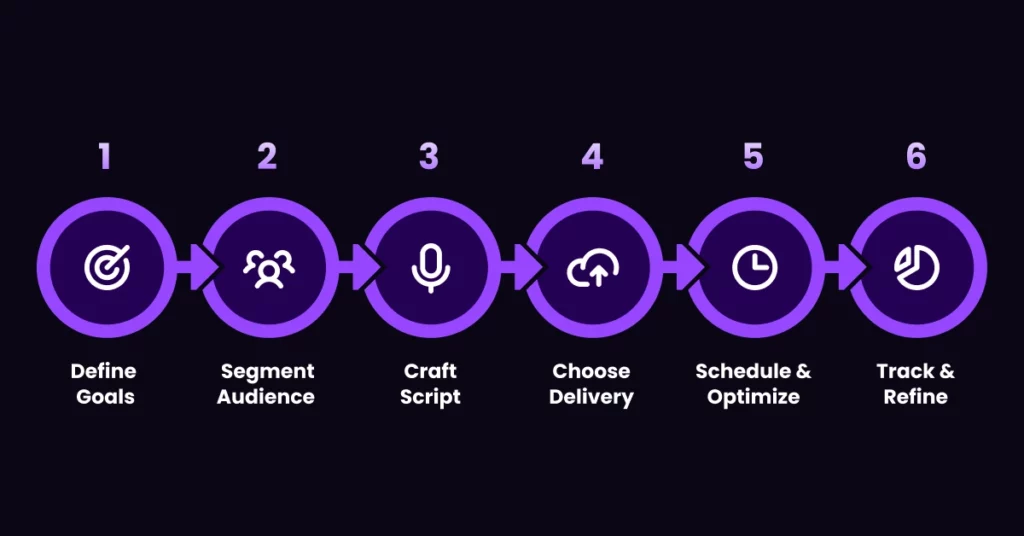
A high-converting campaign starts with a plan, not a clever one-liner. First, pick one clear outcome: more demos, reactivated leads, renewals, or event signups. Then build around that goal. Define simple numbers such as callbacks per 100 drops or meetings per month.
Next, segment your list so each group gets a focused message. Draft a Voicemail Script that is short, friendly, and clear about the next step. Choose how you will deliver: manual dialing, voicemail drops, or Ringless voicemail through an Automated voicemail platform such as VoiceDrop. Finally, set your schedule, launch a small test, and refine based on the data.
Step 1: Define Your Campaign Goals
Decide what success looks like for this campaign. Are you chasing net new leads, reactivating old ones, confirming appointments, or nudging people toward a decision? Be specific. “Book 20 demos this month” is better than “get more interest.”
Clear campaign goals shape who you contact, how often you call, and what you say. They also give you simple success metrics like callbacks, meetings, or signed contracts, so you can see quickly if the campaign is working and worth repeating.
Step 2: Identify and Segment Your Audience
Not every contact belongs in every campaign. Segmentation lets you match the right message to the right people. You can group contacts by industry, role, company size, lead source, or engagement level.
For example, one list might contain new inbound leads, another current customers, and another cold prospects who downloaded a guide but never replied. Once you segment, you can adjust tone, offer, and next step for each group. Cold leads may need more education. Warm leads may just need a clear reminder.
Step 3: Craft a Compelling Voicemail Script
Your Voicemail Script is the core of the campaign. Keep it under 30 seconds. Say who you are, why you’re calling, and what’s in it for them. Then give one clear call to action, such as “call me back,” “reply to my text,” or “book a time from the link in my email.”
Skip jargon and long intros. Focus on the problem you solve or the outcome they want. For ideas, you can study proven sales voicemail and adapt them to your own style and audience.
Step 4: Choose Your Delivery Method
Now decide how you’ll deliver each message. You can call manually and leave a voicemail one contact at a time. You can use voicemail drops that leave a message when the call reaches voicemail. Or you can use Ringless voicemail that sends audio straight to the inbox without ringing the phone.
Manual calling offers flexibility but does not scale. Voicemail drops save time but still place calls. Ringless voicemail is fast and less intrusive, which helps for cold or busy audiences. Platforms like VoiceDrop bundle these options inside one Automated voicemail workflow, while guides keep you aligned with compliance rules.
Step 5: Schedule and Optimize Timing
Timing has a big impact on callback rates. You want to drop messages when people are likely to check and respond. For many B2B audiences, mid-morning and mid-afternoon on weekdays work best. Always respect time zones so a lunch break in one city is not a late-night call in another.
Start with a simple plan, such as one voicemail per contact on Tuesday or Wednesday. Then watch the data. If you see a higher response at certain hours or days, move more of your drops into those windows. You can also pair voicemail with email and SMS to create a simple three-touch rhythm.
Step 6: Track, Analyze, and Refine Campaigns
Once your campaign is live, track what happens. Watch delivery rates, callback rates, and the number of meetings or sales that follow. Use your voicemail platform’s dashboard plus your CRM to see which segments and scripts perform best.
Then refine. Remove touches that do not move the needle, and double down on those that do. This is where A/B Testing helps. Try two versions of your opening line or call to action, send each to a similar group, and keep the winner. Over time, you turn voicemail from guesswork into a predictable channel.
Tips to Improve Campaign Performance
After your first campaign, focus on small improvements. Start with your scripts. Shorten long messages, make the benefit more concrete, and tighten your call to action. Then look at timing and frequency. Too many drops in a week can feel like spam. Too few can slow results. Aim for a gentle, respectful rhythm.
Personalization also matters: simple touches like using a name or referencing a recent demo can lift engagement. You can borrow ideas from conversion rate optimization content and apply the same thinking to your voice funnel.
Test and Refine Your Scripts
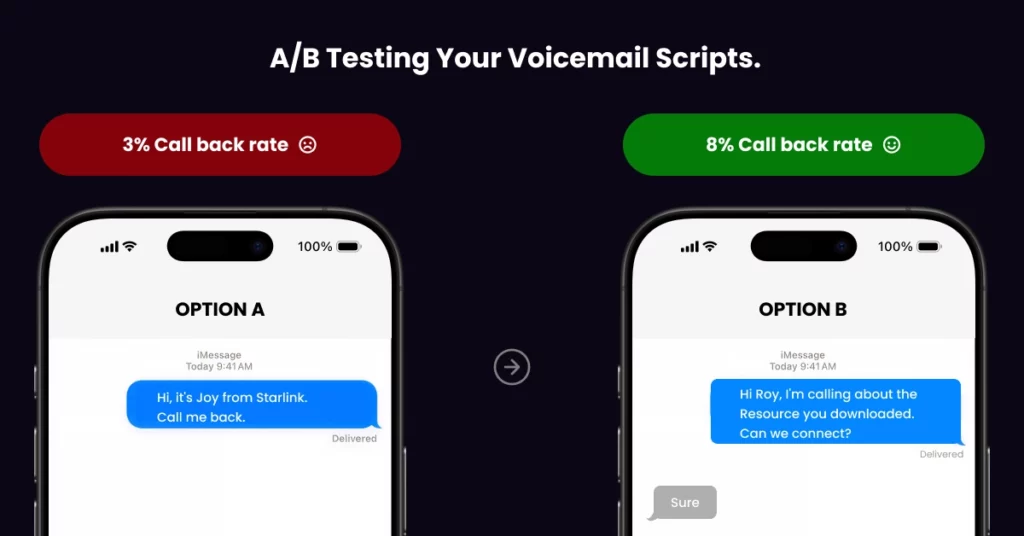
Treat every script as a draft. Create at least two versions for key messages and compare them. Change one element at a time, such as the hook or the call to action, so you can clearly see what works.
Run each version with a similar audience size and timing. Track callback and reply rates, then keep the better version as your new control for future campaigns. Over time, you build a small library of winning scripts.
Optimize Timing and Frequency
Good timing shows respect and boosts response. Start with one voicemail per week per lead and adjust from there. If your data shows more callbacks on certain days or hours, move more of your drops into those windows.
Be careful with frequency during short campaigns such as event promotions or political pushes. A brief spike in touches can work, but only if messages stay relevant and useful and you watch for signs of fatigue or complaints.
Personalize Messages for Better Engagement
People respond when they feel you are talking to them, not at them. Use the data you already have to create a more Personalized Message. Mention their name, company, or the content they requested.
You can also record separate versions of your script for different segments, such as new leads, trial users, and existing customers. Even small changes in wording can make a voicemail sound tailored instead of generic.
Leverage Automation and Analytics
Automation keeps your team focused on real conversations instead of manual dialing. An Automated voicemail workflow with VoiceDrop lets you trigger Automated Messages when someone fills a form, signs up for a webinar, or reaches a stage in your pipeline.
Pair that with analytics so you can see which campaigns, segments, and scripts drive the most value. VoiceDrop’s tools and other Automated tools in your stack make it easier to review performance and keep improving your flows.
Measuring Campaign Success
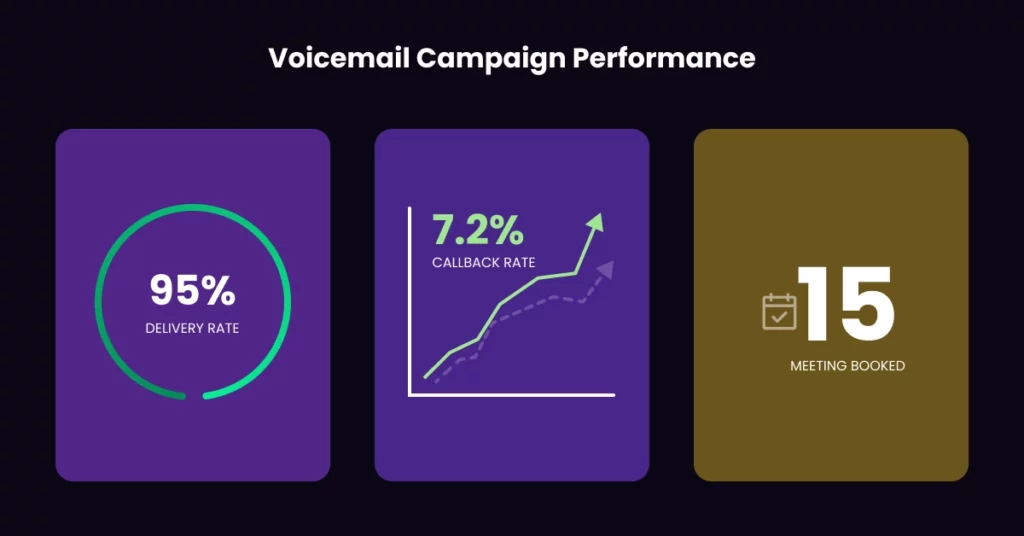
You cannot improve what you don’t measure. Before launch, decide how you’ll judge success. Start with delivery: are your messages landing in real inboxes, or are there many failed attempts? Then track callback rate and other replies, such as texts and emails that mention the voicemail.
Finally, connect those responses to real outcomes like meetings, opportunities, and wins. Put these numbers into a simple weekly report. Compare the voicemail-driven pipeline to what you get from email-only or call-only campaigns. If voicemail reliably drives more qualified conversations for the same effort, it deserves more budget and attention.
Common Pitfalls & Fixes
Most voicemail problems come from a few repeated mistakes. Messages run too long. The call to action is unclear. The tone feels generic or scripted. Or the timing is poor, such as sending drops late at night or on weekends.
Fixing these issues is simple, but it takes discipline. Keep messages under 30 seconds. End every voicemail with a direct next step and a reason to respond now. Use segmentation and basic personalization so your message feels relevant. Respect time zones and holidays. And make sure someone is available to answer callbacks or respond quickly to texts and emails.
Scripts & Message Templates
Having a few templates ready makes it easier to launch new campaigns. You might have one script for cold sales outreach, one for post-demo follow-up, one for event reminders, and one for renewals or upsells. Each should include four parts: your name, your company, why you’re calling now, and a clear call to action.
Keep the language simple and conversational. For example, a follow-up script might remind them of the outcome they said they wanted, then invite them to pick a time on your calendar. Recruiters can adapt the same structure to invite candidates to a quick screening call. Store these templates where the whole team can find and update them.
A/B Testing Guide
A/B Testing helps you turn voicemail from guesswork into a process. Pick one element to test, such as the opening line, offer, or send time. Create version A and version B, then send each to a similar slice of your list.
Track callback and reply rates, plus downstream results like meetings and deals. Keep the rest of the campaign the same so you know what caused the change. Start with “big rocks” such as message angle and call to action. Later, you can test smaller tweaks like different CTAs or subject lines in the emails that support your voicemails.
Launch Checklist
Before you launch, run through a short checklist:
- Confirm your goals and success metrics
- Clean and segment your list
- Review each Voicemail Script for clarity, length, and one clear call to action
- Test your audio quality on a few devices
- Set schedules that respect time zones
- Make sure your voicemail platform, CRM, and other Automated tools are tracking the right events
- Send a small internal test so your team hears exactly what contacts will hear
Once everything looks good, you can scale to your full list with confidence.
Key Takeaways and Action Plan
Voicemail campaigns turn random calling into a simple system. When you set clear goals, segment your audience, use short, focused scripts, and lean on automation, you create a channel that reliably drives callbacks and conversations. Ringless voicemail and voicemail drops make scale possible, while platforms like VoiceDrop and other top ringless voicemail providers handle delivery and tracking.
Internal resources such as VoiceDrop’s political examples, multi-level marketing guide, and automated campaign content round out your playbook. To get started, pick one use case, such as reviving old leads or following up on demo requests. Write a basic script, set up a small campaign, and watch the numbers. Then refine your message, timing, and segments. Repeat this cycle, and voicemail will become a quiet but powerful driver of the pipeline for your team.
FAQ’s
How do I measure the success of a voicemail campaign?
Track key metrics such as delivery rate, callback rate, engagement, and conversions. Use these insights to refine scripts, timing, and targeting for better results.
How long should a voicemail message be?
The ideal voicemail is 20–30 seconds, concise, clear, and includes a strong call-to-action.
What are the common mistakes in voicemail campaigns?
Frequent mistakes include overly long messages, poor timing, lack of personalization, and unclear calls-to-action. Avoiding these can significantly improve engagement.
Should I use automated voicemail tools?
Yes. Tools like VoiceDrop.ai help automate delivery, track performance, segment audiences, and ensure compliance, making campaigns more efficient and scalable.
How often should I send voicemail messages?
Frequency depends on your audience and campaign goals. Avoid oversaturation-typically 1–2 messages per week per lead is effective for engagement without being intrusive.
