

The modern SDR is drowning in administrative tasks.
Imagine your top sales rep sits down with a list of 100 fresh leads in Salesforce. They open a record, manually click the phone number, wait for the call to connect, listen to the ringtone, and if no one answers, manually type “Left Voicemail” into the Activity History.
This process takes 2–3 minutes per lead. The result? They only reach 30 people by the end of the day.
This isn’t just an annoyance; it is a revenue leak. Industry data reveals that sales reps spend only 33% of their time actually selling. The remaining 67% is lost to non-revenue-generating tasks such as data entry and manual dialling.
Cold calling software for Salesforce is the solution to this efficiency crisis. It transforms your CRM from a passive database into an active revenue engine, automating the low-value mechanical tasks so your reps can focus entirely on the high-value task: closing deals.
Why “Native” Salesforce Dialling Isn’t Enough
Many sales leaders assume that because they have Salesforce, they have a phone system. In reality, Salesforce is a Customer Relationship Management (CRM) platform, not a specialised telephony provider. While it stores data beautifully, it lacks the aggressive dialling capabilities needed for modern outbound sales.
The Hidden Cost of Manual Entry
Every second counts in sales development. Unfortunately, for every minute a rep spends typing “Left Voicemail” into a task field, they are losing potential talk time. Over a week, these small administrative pauses accumulate into hours of lost productivity. A dedicated dialer eliminates this by logging the call outcome automatically the moment the rep hangs up.
“Dirty Data” and Missing Logs
Manual processes invite human error. When dialling is manual, reps often forget to log unsuccessful calls, especially when they are tired or frustrated. This negligence ruins data integrity and makes it impossible for managers to track actual activity levels. Furthermore, without accurate logs, you cannot know if a lead has been called once or ten times.
Bad data kills conversion rates. Before you start your next campaign, verify your lead lists and eliminate invalid numbers with 1Lookup’s number validation. 1Lookup is built by the same team as VoiceDrop.
Speed-to-Lead Latency
Speed is the currency of sales. Yet, the physical act of clicking a phone number, waiting for a softphone application to launch, and initiating the dial takes 15 to 30 seconds per call. A power dialer, in contrast, executes this action in milliseconds. Therefore, removing the “click friction” significantly increases the volume of daily outreach.
Core Features of Top-Tier Salesforce Dialers
Not all dialers are created equal. To truly accelerate your pipeline, you must look for specific technical capabilities that integrate seamlessly with your CRM.
Bi-Directional Sync (CTI)
Computer Telephony Integration (CTI) is the bridge between your phone and your computer. It ensures that data flows in both directions instantly. When a contact is updated in the dialer, it must be updated instantly in Salesforce, and vice versa. This synchronisation ensures that your sales team is always viewing the most up-to-date data, regardless of which dashboard they use.
Local Presence Dialling
Trust is the first hurdle in cold calling. Prospects are far less likely to answer a call from an unknown toll-free number. Local presence dialling solves this by automatically displaying a local area code on the prospect’s caller ID (e.g., “212” for a call to New York). Studies show this simple adjustment can increase pickup rates by up to 40%.
Automated Voicemail Drop
This is the biggest time-saver of all. In a standard workflow, a rep might say the same 30-second voicemail script 50 times a day. With automated voicemail drop, the rep can click one button to leave a pre-recorded message and immediately move to the next call while the software plays the audio in the background. For a deeper dive into how this technology works, explore Ringless Voicemail Drop strategies to scale your outreach without burnout.
Power Dialers vs Predictive Dialers: Which One Fits Your Team?
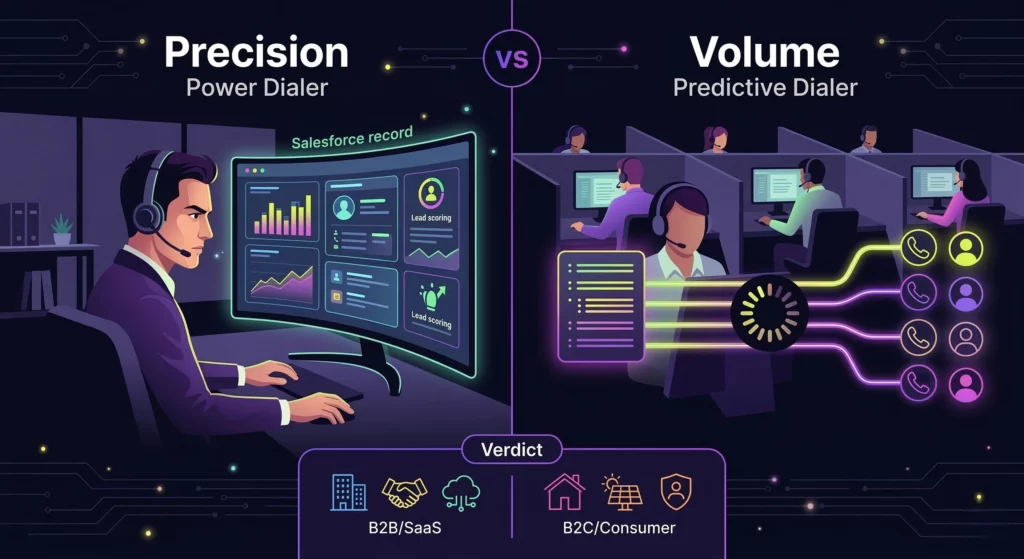
“Auto Dialer” is a broad term. To choose the right Salesforce software, you must define your sales motion.
Option A: The Power Dialer (Best for B2B)
A Power Dialer calls numbers sequentially (one after another).
- The Workflow: The rep clicks “Start Session.” The software calls Lead A. If Lead A doesn’t answer, Lead B is called automatically.
- Why it wins: The rep sees the Salesforce record before the call connects. This allows for “contextual selling” (e.g., mentioning the prospect’s company name).
Option B: The Predictive Dialer (Best for B2C/High Volume)
A Predictive Dialer uses an algorithm to call multiple numbers simultaneously (e.g., 3 people). It only connects the call to a rep when a human says “Hello.”
- The Risk: There is a “telemarketer delay” (pause) before the rep connects, which can kill B2B conversion rates.
Summary Verdict:
- Selling high-ticket SaaS or B2B services? Stick to a Power Dialer.
- Selling insurance, solar, or B2C products? Use a Predictive Dialer.
For more context on how these tools fit into the broader ecosystem, you can review standard Salesforce Sales Cloud Features to see what comes out of the box versus what requires an upgrade.
Integrating VoiceDrop with Salesforce for Maximum Efficiency
Enterprise dialers can cost $150+ per seat. A smarter, cost-effective strategy is the “Hybrid Workflow” using VoiceDrop.
The “Warm Up” Strategy
Instead of having your expensive SDRs cold call raw leads, use automation to filter them first.
- Export & Clean: Export your “New Leads” list from Salesforce to a CSV file. Use a tool like 1Lookup to verify mobile numbers.
- The Drop: Upload the list to VoiceDrop and send a broadcast Ringless Voicemail. (“Hey, this is John from [Company], I have an idea for your team…”)
- The Callback: Prospects listen to the voicemail and call you back.
- The Closing Call: Your SDRs now spend 100% of their time handling inbound calls from interested prospects, rather than dialling cold numbers.
Automating via Zapier
You can also set up a Salesforce Trigger. For example, when a Lead Status changes to “Stalled” in Salesforce, Zapier can automatically trigger a VoiceDrop “Re-engagement” voicemail. See our Integration Guide for setup details.
Step-by-Step: Setting Up Your Salesforce Calling Workflow
For Salesforce Administrators, setting up the dialer correctly is just as important as buying it.
Installing from AppExchange
First, navigate to the Salesforce AppExchange. Always look for “Native” or “Verified” apps to ensure security compliance. Installing a verified app ensures the software adheres to Salesforce’s strict data-handling policies.
Mapping Your Fields
Data mapping is critical for reporting. You must ensure the “Call Outcome” in the software maps to the correct “Task Subject” in Salesforce. For example, a “VM Left” result in the dialer should automatically log as “Call – Left Voicemail” in Salesforce activity history.
Creating “Call Lists” Views
Don’t make reps guess who to call. Teach your team to create specific Salesforce List Views, such as “Leads Created This Week – CA Only.” These views can then be fed directly into the cold calling software to create instant, targeted calling sessions.
Compliance and Legal Considerations (TCPA & STIR/SHAKEN)
In the world of automated calling, compliance is non-negotiable. Ignoring these rules can lead to hefty fines and reputation damage.
DNC (Do Not Call) Registry Management
Your software must automatically check numbers against the federal Do Not Call registry before dialling. This protection should be built in and fail-safe, preventing your reps from accidentally calling a protected number.
Call Recording Consent
If you use call recording for training, you must be aware of state laws governing it. Many states require two-party consent. Therefore, you should configure your software to play a notification or prompt users to request permission explicitly. For a comprehensive overview of the rules, always refer to the FCC Robocall Regulations.
Analytics: Measuring Success Inside Salesforce
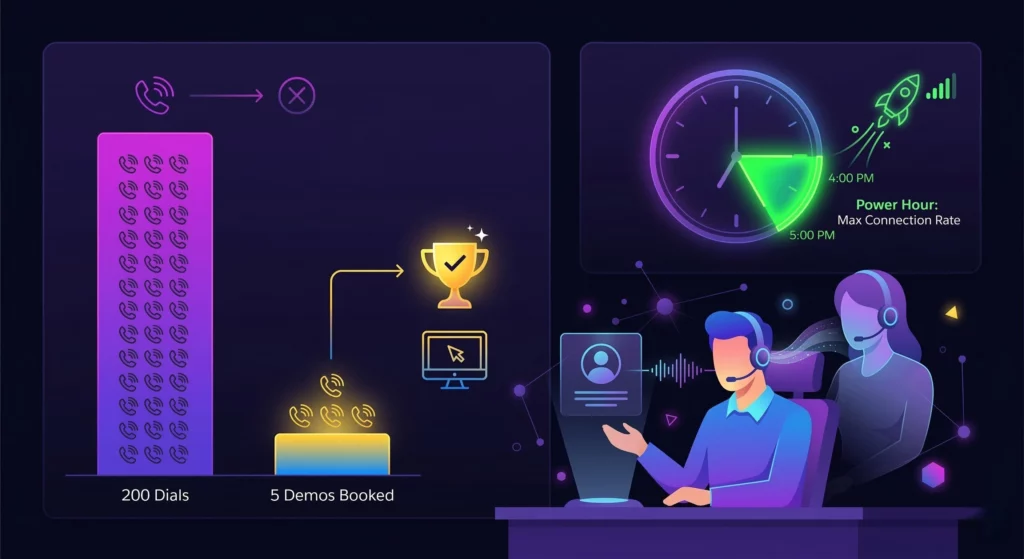
If it’s not reported in Salesforce, it didn’t happen. A good dialer provides deep visibility into team performance.
Activity vs Outcome Reports
Managers often confuse effort with results. You need to differentiate between “Number of Dials” (Effort) and “Demos Booked” (Result). A rep making 200 calls with zero bookings needs coaching, whereas a rep with 20 calls and 5 bookings needs their strategy replicated.
Connection Rate Trends
Data can reveal the best time to call. By tracking connection rates, you might discover that your prospects are most likely to answer between 4:00 PM and 5:00 PM. Subsequently, you can schedule “Power Hours” during these peak times to maximise efficiency.
Shadowing and Coaching
Modern software allows managers to “listen in” on live calls without the prospect knowing. This “whisper” functionality allows you to provide real-time feedback to your rep during a difficult negotiation, effectively training them on the job.
Conclusion
Manual dialling is a relic of the past. In an era where speed and data integrity define success, relying on a standalone phone and a spreadsheet is a recipe for failure. To survive and thrive in 2026, you need automation that syncs perfectly with your source of truth.
Stop wasting hours on manual data entry and start closing more deals. Transform your Salesforce dashboard into a closing machine by integrating smart voicemail automation today.
FAQs
Does Salesforce have a free dialer?
No, Salesforce requires the “Sales Dialer” add-on, and it charges per minute. Third-party integrations often offer flat-rate unlimited calling, which can be more cost-effective for high-volume teams.
Can I use VoiceDrop with Salesforce?
Yes, via Zapier or by exporting reports. This allows you to run massive voicemail campaigns to your Salesforce leads, effectively warming them up before your team makes a call.
What is the best browser for Salesforce dialling?
Chrome is generally the standard for CTI extensions due to its stability with WebRTC technology. It ensures consistent call quality and reliable data syncing between the browser extension and the Salesforce platform.